Setting Breakpoints on All Class Methods

In a recent video John Robbins (probably the world’s leading debugging expert) made a public request of his audience: write a VS addin that enables setting function breakpoints by partial name matches. That is, let the user type C*::M* in some input dialog, and breakpoints would be set at CMyWnd::Move() and in Cookie::Monster() alike.

Well Naveen did pick up the gauntlet and wrote a nice addin to do exactly that. It even goes as far as regular expressions.

Both the original challenge and the given addin relate to managed code only – and it occurred to me this may be the first example in recorded history of a debugging goodie that’s available to native devs before managed devs.   Windbg has had the bm command forever, and while VS does not get quite there  – a while ago Habib Heydarian posted about an undocumented-VS trick that goes a major part of the way:

In the breakpoints window (Ctrl+B) you can type ‘YoueClassName::*’ to simultaneously set breakpoints to all class methods. This was useful to me recently when trying to find the first entry point to a module, and surely it would yet come handy in many other scenarios. In response to my email question, Habib Heydarian confirmed that (a) it is indeed undocumented and as such unsupported – so YMMV, (b) there isn’t any non trivial wildcard pattern matching available yet.  In response to another email question I learnt from John Robbins that  he checked with the expression evaluator developers and they don’t support any form of wildcards for .NET code either. However, it’s on their list of features for Dev 11.  Thus, the brief (and utterly insignificant) favoring of native over managed devs is about to come to an end.

Posted in Debugging, VC++, Visual Studio | 2 Comments

std::vector of Aligned Elements

Update: answers to some questions raised below are available in a newer post.

Fact (1):

Functions cannot accept aligned types by value. That is really a fact of nature, but it can make sense:  the function’s stack frame can be located anywhere in memory, and so a hypothetical aligned argument passed by value cannot be passed at a fixed offset relative to the frame base. There would be no sane way for the function to reference that argument – unless some compiler writer out there is willing to pad every stack frame with some slack, generate function prologues that would take ebp modulo the desired alignment, fiddle with it to deduce the aligned argument location by some convention etc etc etc. Let’s not even start to imagine stack frame cleanup.

Fact (2):

Ever since MMX, and more pronouncedly  since SSE, data alignment is a major, major performance boost opportunity for mathematical code. In games and game-like apps, practically every mathematical object (matrices, vectors, and thus every object that holds them as members) are aligned on 16 byte boundaries.

Fact (3):

In VC++, when you try and instantiate an STL vector of aligned types you get slapped by the compiler:

error C2719: '_Val': formal parameter with __declspec(align('16')) won't be aligned

The reason is that the  implementation of std::vector::resize has the signature –

void resize(size_type _Count, _Elem _Ch);

That is, it accepts an element of the contained type by value. Semantically – resize pads the existing buffer with copies of _Ch  as needed to get to size _Count.

Corollary:

MS’s std::vector is pretty close to useless.

I wasn’t as decisive until recently, when several things happened: (1) I discovered gcc’s implementation does not suffer from the same issue, so it’s nothing inherent in the c++ standard. (2) I manually modified vector::resize’s signature to accept a const reference, and the code compiled cleanly and ran well. (3) Most importantly, I mailed Stephan T. Lavavej, Microsoft’s own STL grand master, and asked him whether I was missing something.    His response was:

I filed internal bug number Dev10#891686 about this.  There’s a reason that our resize() is currently taking T by value – it guards against being given one of the vector’s own elements (which is perfectly legal).  We’ll investigate changing this in VC11, but we’d have to make nontrivial changes to resize() and possibly other places throughout <vector>.

Note that header hacking is unsupported.

Frankly, I don’t fully understand this. The only case I can see when you might need to guard against being given one of the vector’s own elements is when that element is potentially changed by resize’s padding itself. It might happen when your vector buffer holds some slack, you pass _Ch from that slack, and resize into that very slack space, e.g.:

std::vector<CWhateva> v;
v.resize(100);
v.resize(50); // v's storage capacity is still 100
v.resize(100, v[80]); // when _SECURE_SCL is off, there would be no runtime checks and this may run.

Indeed if v[80] is accepted by ref, even const, it would be overwritten in the last line. I don’t see an inherent problem here, as it seems it should be overwritten by a copy of itself – but I can understand the feeling that overwriting an object with itself might be sensitive. (anyone has a concrete example?).

Then again, maybe he meant something different altogether.

Most of all, I gotta say I was mightily impressed with the speed and seriousness of MS’s replies.  I’m developing quite an email-CHUTZPA lately (more in coming posts), and am always flattered to get responses from busy people.  MS does deserve some kudos there – before realizing Stephen was the right address for this inquiry I mailed the almighty Herb Sutter himself, and got similarly swift and informative responses.

Posted in VC++ | 12 Comments

Visualizing MFC Containers in autoexp.dat

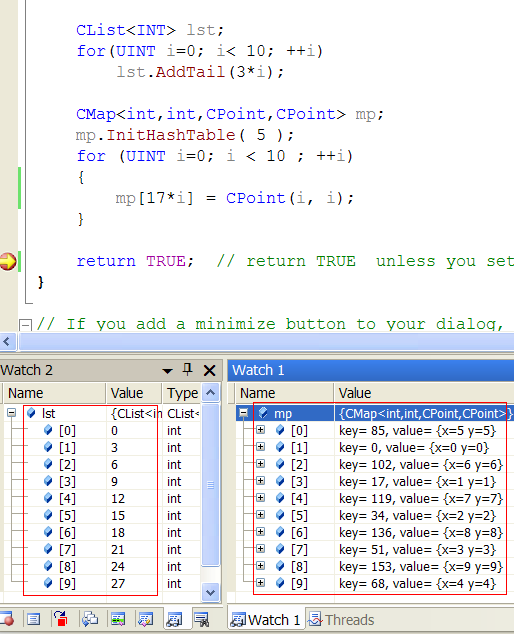
MFC containers are more or less officially deprecated in favor of STL. Even so, when navigating in legacy code the need often arises to watch CArrays, CLists, CMaps and the like. autoexp.dat provides only STL visualizers out of the box, but you can just paste the lines below into autoexp’s [Visualizer] section, and have a similar debugging experience with MFC code:

[Visualizer]
; This section contains visualizers for STL and ATL containers
; DO NOT MODIFY     (HAAAAAAAAA. -o.s.)

...

;---------------------------------------------------------------------
;  MFC Types
;---------------------------------------------------------------------
CArray<*,*> |CObArray|CByteArray|CDWordArray|CPtrArray|CStringArray|CWordArray|CUIntArray|CTypedPtrArray<*,*>{
 preview([$c,!])
 children(
            #(
              #array (
                  expr: $c.m_pData[$i],
                  size: $c.m_nSize
                     )
             )
         )
}

CList<*,*>|CObList|CPtrList|CStringList|CTypedPtrList<*,*>{
 preview([$c,!])
 children(
          #(
              #list  (
                  head: $c.m_pNodeHead,
                  next: pNext
                     ) : $e.data
               )
            )
}

CMap<*,*,*,*>::CAssoc|CMapPtrToWord::CAssoc|CMapPtrToPtr::CAssoc|CMapStringToOb::CAssoc|CMapStringToPtr::CAssoc|CMapStringToString::CAssoc|CMapWordToOb::CAssoc|CMapWordToPtr::CAssoc|CTypedPtrMap<*,*,*>::CAssoc{
preview(#("key= ",$e.key,", value= ", $e.value))
}

CMap<*,*,*,*>|CMapPtrToWord|CMapPtrToPtr|CMapStringToOb|CMapStringToPtr|CMapStringToString|CMapWordToOb|CMapWordToPtr|CTypedPtrMap<*,*,*>{
children (
    #(
        #if ($c.m_nHashTableSize >= 0 && $c.m_nHashTableSize <= 65535) (
            #array (
                expr : ($c.m_pHashTable)[$i],
                size : $c.m_nHashTableSize
                   ) : #list(
                             head : $e,
                             next : pNext
                            ) : $e
            ) #else (
             #(  __ERROR – Hash table too large!!!__: 1,Table size: $c.m_nHashTableSize)
         )
       )
)
}

[EDIT: CAssoc visualizer fix, thanks to @Gerald].

[EDIT: CMap visualizer fix, thanks to @avek]

Here’s what you’d get:

I’m aware of the formatting issues in the snippet above, but the autoexp parser is notoriously fragile and I didn’t want to risk extra spaces for proper line-wrapping.

And btw, unlike Avery (the original autoexp Jedi), I prefer to avoid cluttering the visualizers with ‘raw’ watch entries.  If you ever need to watch into, say, raw members of a CList, just postfix the variable with ‘,!’ , as in:

Posted in Codeproject, Debugging, Visual Studio | 7 Comments

Deleting Folders

RemoveDirectory requires the input folder to be empty. That typically requires repeatedly FileFind’ing the folder contents (either with the MFC wrapper or directly with the Win32 API) and DeleteFile‘ing. Things soon get interesting when you discover you need more code to detect subfolders and recursively empty and delete them – the code for a simple task seems to get out of hand.

Sarath suggests a seemingly more pleasant way, SHFileOperation.  A quick rehash:

bool DeleteDirectory( CString strPath )
{
  strPath += _T( ‘\ 0′ );

  SHFILEOPSTRUCT strOper = { 0 };
  strOper.hwnd = NULL;
  strOper.wFunc = FO_DELETE;
  strOper.pFrom = strPath;
  strOper.fFlags = FOF_SILENT | FOF_NOCONFIRMATION;

  if ( 0 == SHFileOperation ( &strOper ))
  {
    return true;
  }
  return false;
}

This is an attractive alternative indeed, but turns out it has a quasi-bug, a hidden gotcha, bizarre error-reporting and some lacking capabilities.

1. Quasi-bug

MSDN mentions that this sort of SHFileOperation usage must be followed by an SHChangeNotify call. The code should read:

...
if ( 0 == SHFileOperation ( &strOper ))
{
  SHChangeNotify(SHCNE_RMDIR, SHCNF_PATH, strOper.pFrom, NULL);
  return true;
}
...

I call this a quasi-bug because (a) I’ve no idea how SHChangeNotify affects the shell, (b) a toy-test I just did shows that windows explorer immediately picks up this SHFileOperation change without an explicit SHChangeNotify, (c) Not only Sarath but also Jonathan Wood omits the SHChangeNotify call right there on MSDN, and finally (d) this just seems a silly API design. SHFileOperation is a shell API – it can easily (probably has no choice but to-) notify the shell himself of whatever needs notifying, and I cannot imagine a scenario where a user might prefer to skip such a notification.   Gotta ask about this at Raymond’s some day.

2. Hidden Gotcha

You should never use relative paths as an input to SHFileOperation, as (quoting MSDN) “Using it with relative path names is not thread safe”. Apparently the implementation somehow is thread safe for absolute path. Must be some arcane file system issue buried deep inside.

3. Bizarre Error Reporting

Quoting again:

Do not use GetLastError with the return values of this function.

To examine the nonzero values for troubleshooting purposes, they largely map to those defined in Winerror.h. However, several of its possible return values are based on pre-Win32 error codes, which in some cases overlap the later Winerror.h values without matching their meaning. …   for these specific values only these meanings should be accepted over the Winerror.h codes. However, these values are provided with these warnings:

  • These are pre-Win32 error codes and are no longer supported or defined in any public header file. To use them, you must either define them yourself or compare against the numerical value.
  • These error codes are subject to change and have historically done so.
  • These values are provided only as an aid in debugging. They should not be regarded as definitive…

Feels like an all-but-deprecated API, and it is indeed superseded by IFileOperation since Vista.

4. Lacking Capabilities

Things get even more interesting when your folder contains read-only or hidden files. If you do enumerate and delete the folder contents yourself this is easily rectifiable by a SetFileAttributes call. The shell API has no way (that I know of) to achieve similar functionality.

Bottom Line

For any real production code I whole heartily recommend against SHFileOperation calls. Using it has real potential of dooming your code users and maintainers for weird, time consuming bugs.

It’s really not that terrible a bullet to bite – just a few dozen more code lines. Even better, you can find them here (MFC version):


VOID MakeWritable(CONST CString& filename)
{
  DWORD dwAttrs = ::GetFileAttributes(filename);
  if (dwAttrs==INVALID_FILE_ATTRIBUTES) return;

  if (dwAttrs & FILE_ATTRIBUTE_READONLY)
  {
    ::SetFileAttributes(filename,
    dwAttrs & (~FILE_ATTRIBUTE_READONLY));
  }
}

BOOL DeleteDirectory(CONST CString& sFolder)
{
  CFileFind   ff;
  CString     sCurFile;
  BOOL bMore = ff.FindFile(sFolder + _T("\\*.*"));

  // Empty the folder, before removing it
  while (bMore)
  {
    bMore = ff.FindNextFile();
    if (ff.IsDirectory())
    {
      if (!ff.IsDots())
        DeleteDirectory(ff.GetFilePath());
    }
    else
    {
      sCurFile = ff.GetFilePath();
      MakeWritable(sCurFile);

      if (!::DeleteFile(sCurFile))
      {
        LogLastError(); // just a placeholder - recover whichever way you want
        return FALSE;
      }
    }
  }

  // RemoveDirectory fails without this one!  CFileFind locks file system resources.
  ff.Close();

  if(! ::RemoveDirectory(sFolder))
  {
    LogLastError();
    return FALSE;
  }
  return TRUE;
}
Posted in Win32 | 4 Comments

Playing With Strings

Take the following code:

	CString str1("Startt"),
			str2("Start\0");
	str1.SetAt(str1.GetLength()-1, '\0');

	str1 += "End";
	str2 += "End";

What would you see when watching the resulting strings? Probably not what you expect:

This is a simplified version of a much dirtier, very real bug I dealt with recently. Several string and debugger features joined forces to cause this behaviour.

First – the debugger: it apparently watches CStrings as c-strings – displaying their essentially-LPTSTR member m_pszData.  Thus, any null embedded in the string (well, the first null, really) is treated as a terminating null – anything past it would not be displayed. When we force a watch on the full CString buffer, a fuller picture is revealed:

So the ‘End’ suffix was added to str1 after all – but why the difference between str1 and str2?  How can initializing a string with an embedded null be any different than setting that null in the next line? The next clue is obtained by observing GetLength() for both strings. Note that GetLength returns the length of the allocated string buffer, not the strlen of the underlying c-string. (It is utterly unimaginable that such a basic behaviour goes undocumented.)


So, str1 and str2 are indeed somehow different before adding the ‘End’ suffix. In fact, they are fundamentally different even before manually setting the null in str1:

	CString str1("Startt"),
			str2("Start\0");

	int len1 = str1.GetLength(),	// gives 6
		len2 = str2.GetLength();	// gives 5 !

The issue now has nowhere left to hide. Stepping with the debugger into the CString ctors reveals the root cause: the constructor used for both CStrings accepts a char*-type as argument (in retrospect – how could it be otherwise?). So, just like in the debugger itself, the first embedded null is treated as a terminating null – anything past it would never make it into the CString. Try the following and see for yourself:

	CString str3("First\0Second"); // str3 now contains only "First" !

Once this root cause was understood, the bug was a half-line fix.

Thanks and kudos go to Alexander M. of wordpress support, who found and fixed within 1 hour (!) a wordpress bug that I reported, to make this post possible: until yesterday, wordpress would ignore explicit nulls (backslash + zero) between quotes, in a sourcecode section.

Posted in VC++, Visual Studio | 6 Comments

OptimizedMesh DirectX Sample Having Issues With Large Meshes

The DirectX SDK comes with quite a few nice samples, neatly organized in a sample browser. Quoting the documentation from the OptimizedMesh sample:

This OptimizedMesh Sample sample demonstrates the different types of meshes D3DX can load and optimize, as well as the different types of underlying primitives it can render. An optimized mesh has its vertices and faces reordered so that rendering performance can be improved.

Sadly, it turns out the code as is cannot load meshes with more than 64K vertices (much less optimize them). Now I’m sure somewhere in the SDK a disclaimer is buried, saying there’s no warranty, this isn’t production code, the usual yadda yadda. Still , seemed to me like optimizing meshes is a topic that is of interest mostly to an audience dealing with large meshes (certainly I was), so this really deserves a fix.

The sample browser comes with neat ‘feedback’ links, and I did communicate this to MS a while ago. They never did get back to me, so I thought someone out there might benefit from the fix online.

In the main source file, OptimizedMesh.cpp, make the following addition:

...
// Load the mesh from the specified file
hr = D3DXLoadMeshFromX( strMesh, D3DXMESH_SYSTEMMEM, pd3dDevice,
      ppAdjacencyBuffer, &pD3DXMtrlBuffer, NULL,
      &g_dwNumMaterials, &pMeshSysMem );

if( FAILED( hr ) )
   goto End;

if(pMeshSysMem->GetOptions() && D3DXMESH_32BIT)
   g_dwMemoryOptions |= D3DXMESH_32BIT;

// Get the array of materials out of the returned buffer, and allocate a texture array
d3dxMaterials = (D3DXMATERIAL*) pD3DXMtrlBuffer->GetBufferPointer();
...

In a nutshell, the culprit is a tragic legacy of DirectX mesh files: by default, meshes allocate only 16 bit for a vertex index in the stored index buffer. Thus, meshes with more than 2^16 vertices require some explicit treatment – as listed here.

Posted in DirectX | Leave a comment

Coders at Work

I started reading Coders at Work, and it is just as good as Jeff and Joel say. The Jamie Zawinski chapter is brilliant. Brad Fitzpatrick  – while he may be an exceptional developer, he’s a ‘wow, like, dude!’  kind of speaker, and not much fun to read. The real highlight for me (so far) is Peter Norvig.

So far I’ve been successfully avoided the temptation of rehashing stuff in this blog, but the Norvig interview is just too good. Every single paragraph in his interview is worth hanging as an office poster.  (Plus, unlike the Zawinski interview, I haven’t seen it quoted around that much yet). Here are a few of his words, that are a real lesson to live by:

Seibel: How do you avoid over-generalization and building more than you need and consequently wasting resources that way?
Norvig: It’s a battle. There are lots of battles around that. And, I’m probably not the best person to ask because I still like having elegant solutions rather than practical solutions. So I have to sort of fight with myself and say, “In my day job I can’t afford to think that way.” I have to say, “We’re out here to provide the solution that makes the most sense and if there’s a perfect solution out there, probably we can’t afford to do it.” We have to give up on that and say, “We’re just going to do what’s the most important now.” And I have to instill that upon myself and on the people I work with. There’s some saying in German about the perfect being the enemy of the good; I forget exactly where it comes from—every practical engineer has to learn that lesson.

Seibel: Why is it so tempting to solve a problem we don’t really have?

Norvig: You want to be clever and you want closure; you want to complete something and move on to something else. I think people are built to only handle a certain amount of stuff and you want to say, “This is completely done; I can put it out of my mind and then I can go on.” But you have to calculate, well, what’s the return on investment for solving it completely? [My emph – OS] There’s always this sort of S-shaped curve and by the time you get up to 80 or 90 percent completion, you’re starting to get diminishing returns. There are 100 other things you could be doing that are just at the bottom of the curve where you get much better returns. And at some point you have to say, “Enough is enough, let’s stop and go do something where we get a better return.”

Posted in Design | 1 Comment

Editing Binary Resources with VS

The need occasionally arises to modify binary resources without re-compilation. Say you want to change the manifest-dependencies of a dll you don’t have the source to.  Or you wish to bump up the version of an executable without actually working on it, exactly as, ahem, a good friend of mine sometimes does.

A quick search will get you tons of free and commercial dedicated tools for the task.  I accidentally learnt that you already have such a tool. It’s called Visual Studio.

Just 0pen your binary (exe, dll, ocx etc.) as a regular file from the menu (you can’t drag-n-drop it in). All the file resources are there on the screen, for you to abuse.

Posted in Visual Studio | Leave a comment

Duplicate Volume Serial Numbers

We recently released a product version, with yearly licenses attached to the machine’s Volume Serial Number.  Now it is called a ‘serial number’, and it seems as meaningless and as random as a UID (mine is 34EE-10A0), so it must be a UID. Right?

Well, not quite. This ID characterizes a volume, not a disk. If you have a partitioned disk, just type at a command prompt  ‘dir c:’ and ‘dir d:’ (or whatever) and watch your partitions’ different VSNs. As the link teaches, the VSN data is part of the partition’s extended boot sector, and is no more then a hash of the partition-creation date & time (i.e., disk formatting date & time).  So, it’s not technically unique – if any two disks are formatted (or partitions created) at the exact same time, they’d have identical VSN. Also – since its only 4 Bytes, the chances of a random hash-duplication are very real.  Just for the sports, if it’s evenly distributed and the world has, say, 1 billion computers,  the chances of duplicate-free distribution of VSN is around 0.187^(1 billion). So there are out there in fact quite a few duplicate VSNs.  But hey – unless you’re Microsoft, such global-scale stuff really shouldn’t trouble you. I mean, c’mon – say you have – what, 1000 clients? 10,000?  make it a hundred-thousand clients. You should never worry about the chance of a duplicate VSN. Now should you?

The real and sad answer, as I recently discovered, is that if you have two clients who use an identical computer model (at least by Dell, but probably true for all other major vendors), the chance of them having identical VSN is exactly ONE.

Dell do not separately format and install every hard drive of the kajillion they deploy. They make some master copy, then deep-copy it around (as us home users do with Acronis, Norton Ghost or whatever). As noted, the VSN is part of the data on the disk, and so is copied as well.

We tried to confirm this officialy with Dell, so far without success. The issue has very sparse web presence too, hence – this post. Hope it helps someone.

Posted in Win32 | Leave a comment

Memory Fragmentation Trouble

We recently had some weird issues that turned out to emanate from a failure to allocate a large consecutive chunk of heap memory.  (It was an exceptional pain to nail the cause there – maybe more on that in a future post).  The desired allocation was to be  ~400M, and since machines today ship more-or-less-by-default with 2G-4G RAM, there shouldn’t be a real justification for such allocations to fail.  Or should there?

First of all, regardless of your available physical RAM, your real memory playground size is 2G – the bottom half of your process’ address space, its user-mode portion.  Yes, I’m well aware of the /3GB boot.ini switch, and trust me – you don’t want to go there in a 3D application. I was badly burnt there already.  PAE/AWE have downright hostile API sets too – you’d just have to do with 2G.

The real issue here is memory fragmentation.

An obvious solution would be migrating to Win64, and forgetting about fragmentation issues for the near century. Sadly, this was not a feasible option for us: we have a legacy stash of in-house 32-bit custom hardware drivers, and migrating those would be the absolute last resort.

Happily, a  surprisingly short online research gave quite a few constructive 32-bit directions. Here are some.

  1. Low Fragmentation Heap is a nice built in feature, on by default since Vista.  you should apply LFH to the CRT heap, retrieved by _get_heap_handle (just try the sample code). Even better – try applying to all process heaps.   There should be no reason not to apply this to all projects, except (screeeeeeeeeeeeech..) it seems the magic doesn’t work on standard debug builds.  Which, well, err, makes it kinda useless.
  2. HeapDecommitFreeBlockThreshold is a magical registry key that is advertised to make a noticeable difference. It does so by causing the heap to hold on to small allocations just a bit longer. Such increase of the HeapManager jurisdiction can potentially prevent page ‘theft’ for non-heap usage, thereby reducing some fragmentation factors.
  3. Typically a lot of fragmentation (at the 100Megs scale) is caused by sparse mapping of binary images to the process address space, at load time.
    In simpler English, say your process uses forty 1-Meg dll, and maps them to memory in regular 50Meg intervals.  They now sparsely occupy just 40Megs of your available 2G, leaving no consecutive memory chunk larger than 49M!
    To counter that, first map your virtual address usage. Until recently you’d have to use either vadump or direct code instrumentation, but since this summer you have the incredible (as always) SysInternals tool VMMap. When you spot some dll’s that are just teasingly smiling at you from the middle of your address space, use editbin.exe to ruthlessly rebase them away.
  4. Pre-designate a large heap (say 500M) at link time, thus giving the heap a head start in the race for consecutive pages.

I decided to try the steps in order of increasing effort, and am overjoyed to say (2) & (4) sufficed. We now successfully allocate 400M chunks.

We did peek into the process with VMMap, though, and it did surface some interesting finds. For one, babylon translator, installed on all our development machines, has the HUTZPA to inject captlib.dll into the very middle of our precious address space.

My hunch says rebasing could indeed hold the highest impact. We may have to try that too eventually – I hope to post with some findings.

Posted in Win32 | Leave a comment