Debug/Release Numerical Differences

We recently had trouble reproducing in debug builds the exact numerical behavior of release builds.   This just happens  occasionally, and we’re used to accept it as some compiler black magic.  This time we dug a bit deeper – I’m pretty confident we understood all root causes.

1.    Different code paths

Here’s a very real code snippet:


VECTOR& VECTOR::Normalize()

{
#if defined( _DEBUG )
 D3DXVec3Normalize((D3DXVECTOR3*)this, (D3DXVECTOR3*)this);
#else
   float norm2 = x * x + y * y + z * z;
   __m128 val = _mm_load_ss( &norm2 );
   _mm_store_ss( &norm2,
       _mm_and_ps(
             _mm_cmplt_ss( _mm_set_ss( EPSILON ), val ), _mm_rsqrt_ss( val )
                 )       );

   x *= norm2;
   y *= norm2;
   z *= norm2;

#endif

return *this;
}

Not only are the execution results numerically different, the _DEBUG path consistently runs 30% faster..

2.    /arch

Release builds were compiled with /arch:SSE2, (project properties-> Configuration properties -> C/C++ -> Code Generation-> Enable enhanced instruction set) while debug builds weren’t.

This means release builds were aware of SSE instructions, and mostly favored them over FPU instructions. Even for scalar computations, SSE is usually faster – but by default it differs in computational precision (roughly, SSE: 32 bit, FPU: 80 bit).

3.    Floating point model

Release builds were compiled with /fp:fast, and debug builds with /fp:precise. (Project properties-> Configuration properties -> C/C++ -> Code Generation-> Floating point model).

That’s a heavier issue, and in some sense the root cause. A thorough survey is here.

In a nutshell – the C++ standard is strict about order of operations, and about points of intermediate rounding (from register precision to final stack precision). For example, an expression like ‘a+b+c’ must be evaluated as ‘(a+b)+c’.   a+(b+c) is usually different – since we’re working with finite precision floats:  to see why, try  a= 1.0,  b = c = 2^(-24)  (other examples at the link).

When you compile with /fp:fast, you explicitly say “dear compiler, I don’t care about this crap. When you see stuff like ‘a+b+c’, assume I don’t mind how you evaluate it – if I did, I’d put parenthesis”.   The compiler is free to make many optimization choices – a comprehensive list is at the link.

When we set /fp:precise to release builds, (after the previous 2 fixes), all remaining numerical differences vanish (well, at least all those I tested).  However in some scenarios I tested the performance penalty is tangible.

For now we set /fp:fast to all configurations (including debug) in all projects. Sadly, some numerical differences remain (the compiler does take different choices in optimized and non-optimized builds), but they seem 2 orders of magnitude smaller.

Bottom Line

After correcting for these factors, there is a much, much better chance of reproducing release-behaviour in debug builds. If there’s a behaviour you’re still unable to reproduce, try compiling both release & debug with /fp:precise and reproducing. This is the only official way of producing consistent results.

Posted in Debugging, VC++ | 4 Comments

Debugging Memory Leaks, Part 2: CRT support

This feature is well documented, but yet from what I see – doesn’t get the usage it deserves. Here’s a quick, beginner-oriented rehash – if only to refer my teammates.

Problem and Immediate Solution

If you’re developing MFC apps, the way you’ll usually notice any leaks is by terminating your app and seeing the following in the output window:

Detected memory leaks!
Dumping objects ->
C:\myfile.cpp(20): {130} normal block at 0x00780E80, 64 bytes long.
Data: <      > CD CD CD CD CD CD CD CD CD CD CD CD CD CD CD CD
Object dump complete.

the {130} is emphasized on purpose – it is the serial number of the leaking allocation.  What if you could count allocation occurrences, and break in exactly the leaky one?  You could not only get a complete stack trace for the leak, but even step and debug it!

Well, it might not be that easy.  If the allocation serial number is not consistent across multiple runs, it means the leaking memory is allocated in a threaded code portion.  In such cases, you’re probably better off resorting to other methods.

Now if the serial number is consistent, what allocations exactly does it count? In what API do you brake??  must you really set a breakpoint with a ‘hit count’ there?  If the number is high, it could easily get prohibitively slow.

Happily, there is an easy solution to the second set of worries. Early in your code, call –

_CrtSetBreakAlloc(130)

Mid-depth Dive

The _CrtSetBreakAlloc trick is an iceberg-tip of some heavier CRT machinery. It is entirely operated for you if you use MFC, but you can use it yourself in non-MFC apps (although you should watch out for some issues).

The dump that starts it all is the output of _CrtDumpMemoryLeaks.  You can call it directly in your app – but if you’re down to a binary search for the leak , you  might prefer _CrtMemDumpAllObjectsSince for more fine-grained control of the allocations you dump. Maybe more on that in a future post.

The allocation counter resides in the undocumented _heap_alloc_dbg, which channels calls from all C allocators – namely new, malloc, and their brethren (_malloc_dbg, aligned /offset flavours, etc.).  This is a CRT apparatus, so naturally it won’t catch direct OS allocations (HeapAlloc, VirtualAlloc et. al.), not to mention COM allocators (SysAllocString, CoTaskMemAlloc etc.).

When you do set an allocation breakpoint, you’d (naturally) break in the counting function itself, _heap_alloc_dbg.  Your own code probably resides a good 4-5 stack levels below – go there and debug away.

Bonus

You can do all the above at runtime, from the debugger. The documentation for VS2005 says you can put –

{,,msvcr71d.dll}_crtBreakAlloc

in the watch window, and modify its contents directly (say, to 130). However, the documentation is wrong in 3 places.

  1. For VS2005, the correct dll version is msvcr80d.dll. This seems to have been fixed for the VS2008 and VS2010 pages.
  2. When using the context operator, you must use decorated symbol names – which amounts to adding another underscore.
  3. The value is an int*, and for some reason my debugger fails to deduce it himself.

All in all, just type at the watch window –

(int*){,,msvcr80d.dll}__crtBreakAlloc

And debug happily ever after.

Digg This
Posted in Debugging, VC++ | 3 Comments

Viewing Debugee Environment Variables

Koby asks – “How suitable is VS automation for doing something like printing the values of all environment variables in the debugee process”?

In fact, I just learnt how to do that.

type ‘$env=0’, either at a watch window or an immediate window.

Doesn’t get much easier than that.  And unlike the commenter, it works magic for me in VS2005 too.

Posted in Debugging, VC++, Visual Studio | 2 Comments

Breaking on System Functions with the Context Operator

[Edit, Aug 2010:] About a year after this trial-and-error-ish investigation, I accidently found this hidden bit of documentation which pretty much sums it up.

The context operator is technically documented, although barely so. Seemed to me the reason is that it’s mostly broken – but turns out you can in fact get some value out of it.

The documented syntax template is:

{[function],[source],[module] } location

(it is one of 3 different templates, but that’s the one that’s useful to me). Apparently these names have different meaning in different contexts.

Broken, Official Syntax

Here ‘function’ seems to mean function name, ‘source’ means source file, ‘location’ means line number in source file. Some of the documented examples prefix it with ‘@’, others with ‘.’. (edit: this is explicitly acknowledged elsewhere, but never explained).  From brief experimenting, however, none of these are working and this feature seems all but completely broken.

{,MySource.cpp,}@20


can get you to break at random locations in the file, or refuse to parse altogether.

{MyFunc, MyApp.cpp,}@3

May actually work. May also set the break location at a different line in the function. If the specified line is out of the function range, it may either set a break at a seemingly random source location or fail to parse.

etc. etc.  Documentation hasn’t changed between VS2003 and VS2010, and it seems these issues aren’t going anywhere anytime soon.

Working, Not-Really-Official Syntax

Turns out if you interpret ‘location’ as a function name, you may actually get some work done.  This is mentioned as a single-line example in the VC6 documentation, and also sporadically on the web.  For example:

{,,}MyFunc

Actually works.

With slight modifications (that Gregg does not mention), this can be used to break into functions with no source code: (a) include the module (i.e., exe/dll name) and (b) use decorated function names (this is said to be redundant since VS2008).  Needless to say, if you intend to break in MS functions (Win32, CRT or other), you’d need to obtain public MS symbols – maybe more on that in a future post.

For example,

{,,}OutputDebugStringW


would fail to parse,

{,,}_OutputDebugStringW@4


would parse successfully but will not set a break, and finally –

{,,kernel32.dll}_OutputDebugStringW@4

would get the job done.

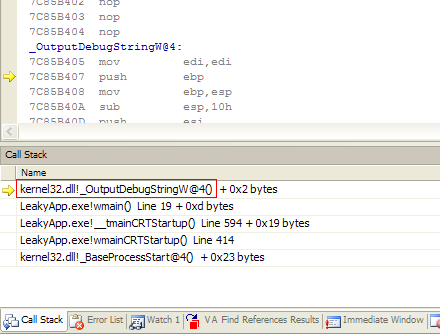
Getting decorated names can be much easier than stated before, since most interesting MS functions are C functions: the decorated name (and module) can be viewed in the call-stack window, by stepping into the function (in disassembly):

decorcallstack

Posted in Debugging, Visual Studio | 9 Comments

Obtaining Decorated Names

There is a neat command line tool called UNDNAME.EXE to un-decorate a name, but what if you need the opposite? I.e., given a function header, how do you get its decorated name?

Well, you could reconstruct it manually. The decoration scheme is intentionally undocumented, but at least 2 efforts were made to reverse engineer it.

If the name you’re after is of a function from your source, you can momentarily plant a FUNCDNAME inside it to get access to the decorated name from your code, and then, say, OutputDebugString it.

In the general case, there are two documented ways to obtain the decoration:

(1) Using DUMPBIN,

(2) Using a Listing File.

Using a listing file is superior in at least two ways: (a) it is one stage shorter – you don’t need to perform extra-analysis on compilation outputs, and (b) the step you save requires a command shell, which I personally avoid like the plague. Seriously, it is 2009. You shouldn’t work like they did in 1980 unless you have absolutely no choice.

In a recent StackOverflow discussion, two other options came up: using map files, and using dependency walker. These seemed like valid, even creative, solutions – and I wondered why MS didn’t document them as valid ways to observe decorations.

Well, MS chose so for a reason. Both suggestions have a fundamental flaw: map files, as well as dependency-walker display, contain only decorated names. This can be a serious problem if you need to isolate the decorated name to one of several function overloads. Your map file can, for example, include the following two names:

?ExtractElement@@YAHV?$_com_ptr_t@V?$_com_IIID@UIDCXOBJ@@$1?_GUID_5a54cea3_94aa_11d6_bdc8_00c04f03ca8b@@3U__s_GUID@@B@@@@KAAV?$CStringT@DV?$StrTraitMFC_DLL@DV?$ChTraitsCRT@D@ATL@@@@@ATL@@@Z
?ExtractElement@@YAHV?$_com_ptr_t@V?$_com_IIID@UIDCXOBJ@@$1?_GUID_5a54cea3_94aa_11d6_bdc8_00c04f03ca8b@@3U__s_GUID@@B@@@@K@Z

Have fun deciding which of the two matches –


BOOL ExtractElement( IDCXOBJPtr pObj, CONST DWORD Tag , CString& strOut)

Posted in VC++ | 1 Comment

Searching Through Memory in Visual Studio

MS maintains two separate debugger product lines – one (supposedly owned by the smaller team) being WinDbg and the other shipped with Visual Studio. There’s an ever-going online flame for superiority between fans of both debuggers (sample 1, sample 2).

By and far WinDbg is considered the ‘serious’ brother, and partially for a good reason.  There are important domains where WinDbg is the only option – notably kernel mode debugging. It is also said to be easier on remote debugging (which I’ve tried only with VS, and admittedly had some trouble).  However, I’ve too often seen claims for WinDbg superiority that are just based on poor VS skills – I’ll try and dedicate some posts to show VS parallels of common WinDbg capabilities.  I currently believe if you do user mode debugging with source code (even in production builds), there’s no real reason for you to step back to the command-line UI of WinDbg. I’d be happy to hear if anyone has different experience.

So, starting off with memory search. This is a relatively known capability of WinDbg, but it’s apparently much less known it is in fact available in VS.

You can search through a memory range for a particular pattern (e.g., a string) or one of several patterns. You do this by typing at the Immediate window (Ctrl+Alt+I while debugging), and the complete syntax is here.

A notable shortcoming of VS is that it does not implement the ‘L?’ address-range WinDbg syntax, so a single search is limited to a memory range of 256M.  On the few occasions where I needed this functionality, this wasn’t a major issue.

Digg This
Posted in Debugging, VC++ | 5 Comments

Debugging DICOM Query/Retrieve Communication

I recently had the questionable pleasure of writing a DICOM Q/R-module, for communication with a PACS. A future post may be dedicated to letting some steam out, and listing in detail the reasons I consider DICOM to be the worst standard I came across – but this post is meant only to give one (hopefully) substantial development tip, for fellow DICOM warriors.

Suppose, for example, the functionality you’re debugging is querying a PACS for the list of imaging studies performed on a particular patient.

First, get your hands on some DICOM utility that does the work you’re trying to do (IDoImaging had tons of these.). I used JDicom and will refer to it below for brevity, but really, any will do.

Medical Connections, makers of DicomObjects, give away free access to a custom DICOM server specifically designated as ‘A public resource for all DICOM developers to use for testing’. It supports all Query/retrieve service class commands. It accepts any AE title, and responds to the sending AE. As of this writing, its URL is http://www.dicomserver.co.uk and its IP is 87.106.65.167 – but check the link, as it had changed only recently.

What’s so useful about the Med-Conn server is that it dumps a very, very detailed log of all activity – down to every single DICOM element, in every message, in every association it handles.  Partial dump sample:

14:01:15 (8941) IN  Command = 30
14:01:15 (8941) IN  SOP Class = 1.2.840.10008.1.1
14:01:15 (8941) IN  Verification request Received
14:01:15 (0) in main Send Verify Received
14:01:15 (8941) OUT  (0000,0000) 0004 UL 66 (0x42)
14:01:15 (8941) OUT  (0000,0002) 0012 UI 1.2.840.10008.1.1
14:01:15 (8941) OUT  (0000,0100) 0002 US 32816 (0x8030)
14:01:15 (8941) OUT  (0000,0120) 0002 US 1 (0x1)
14:01:15 (8941) OUT  (0000,0800) 0002 US 257 (0x101)
14:01:15 (8941) OUT  (0000,0900) 0002 US 0 (0x0)
14:01:38 (8941) IN   (0000,0000) 0004 UL 56 (0x38)
14:01:38 (8941) IN   (0000,0002) 0012 UI 1.2.840.10008.1.1
14:01:38 (8941) IN   (0000,0100) 0002 US 48 (0x30)
14:01:38 (8941) IN   (0000,0110) 0002 US 2 (0x2)
14:01:38 (8941) IN   (0000,0800) 0002 US 257 (0x101)
14:01:38 (8941) IN  Command = 30
14:01:38 (8941) IN  SOP Class = 1.2.840.10008.1.1
14:01:38 (8941) IN  Verification request Received
14:01:38 (0) in main Send Verify Received
14:01:38 (8941) OUT  (0000,0000) 0004 UL 66 (0x42)
14:01:38 (8941) OUT  (0000,0002) 0012 UI 1.2.840.10008.1.1
14:01:38 (8941) OUT  (0000,0100) 0002 US 32816 (0x8030)
14:01:38 (8941) OUT  (0000,0120) 0002 US 2 (0x2)
14:01:38 (8941) OUT  (0000,0800) 0002 US 257 (0x101)
14:01:38 (8941) OUT  (0000,0900) 0002 US 0 (0x0)

Quoting the Medical-Connections page:

The live log files are available at the following URL :

http://dicomserver.co.uk/logs

Note that the log files may contain a mixture of your own and other users’ activity, but they restart every hour in order to keep the size manageable.

– but do check back the original link, to validate the logs address.

Next – hook up both JDicom and your own software to communicate with the Med-Conn server. Take a first pass with JDicom – either upload your own sample study (make sure you anonymize!), or query the UIDs of some patients & studies lying around there.

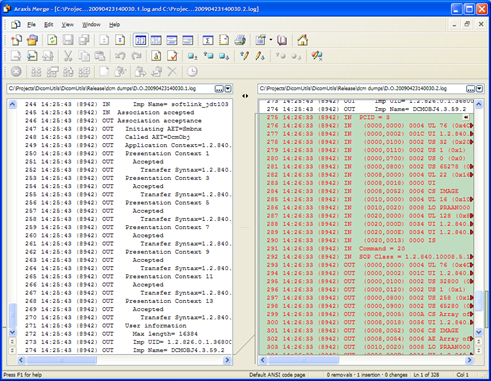
Just before you start, save a copy of the current log. Perform the desired transaction using JDicom (i.e., the tool that works). Update the log page and save a 2nd copy. Now, diff the two logs (image below is illustrating Araxis usage). The difference you are seeing is nothing less than a complete trace of a correct form of the transaction you’re trying to perform.

diff1

Lastly, repeat the process with your own software in place of JDicom (i.e., use the tool that needs fixing). You end up with a complete trace of the transaction YOU are invoking.

Diff these two!

Some of the differences you’ll spot are supposed to be there (e.g., various association UIDs) – but after a minute or so of noise cleanup, the important difference (a.k.a, the bug) would easily jump into view.

Enjoy!

Digg This
Posted in Debugging, DICOM | 4 Comments

Sound Alerts on VS Events – Revisited

I started using the sound alerts on a machine with VS2008 express – and I just learnt that this tweak works for VS2003 and VS2008 but not VS2005. Here’s how it (apparently) came about:

First, MS deliberately took it out. Quoting Paul Harrington: “The audio cues were removed for performance reasons. Initializing the multimedia DLLs to play the sounds was costing several hundred milliseconds in some high priority performance scenarios.”

That was a weird move – made even weirder by not removing the control panel options for setting build event sounds.

Indeed, MS got a lot of heat from devs and changed their mind – both on that same forum thread (quoting Harrington again: “We made the wrong engineering decision to remove the feature..”), and on MS connect. The feature happily returned on VS2008.

Digg This
Posted in Visual Studio | Leave a comment

Sound alerts on VS events

When a build is more than a few seconds, I often drift off – to either productive or unproductive activity, but anyway into something I must snap out of. So for me personally, the following just discovered tweak can be a noticeable productivity enhancer:

You can select sounds for VS to play on the following events –

  • Build succeeded,
  • Build Failed,
  • Build Canceled,
  • Breakpoint hit.

In a remarkable display of weird UI design, these are set nowhere near Visual Studio, but rather under Control Panel / Sound and Audio Devices. In the ‘program events’ list, scroll down to ‘Microsoft Visual Studio’, and choose your sounds.

Digg This
Posted in Visual Studio | 1 Comment

Coding Binary as Binary

If you’re comfortable with hex, you have no business in this post.  If on the other hand, when faced with a mask like 0xFFA8 you’re forced – like me – to translate it on paper into 11111111 10101000,  then by all means, read on.

Being the hex-challenged (hexicapped?) that I am, I badly need to somehow express 0x7F800000 as (0111 1111 1000 0000 0000 0000 0000 0000). With some nerve, I’m not willing to sacrifice any run-time performance to get there.  Good news are, this can be done. Better news are, it involves some neat preprocessor and metaprogramming tricks!

C++ Template Metaprogramming gives an excellent starting point:

template <unsigned long N>
struct binary
{
   static unsigned const value
     = binary<N/10>::value << 1   // prepend higher bits
       | N%10;                    // to lowest bit
};
template <>                           // specialization
struct binary<0>                      // terminates recursion
{
static unsigned const value = 0;
};
// usage:
unsigned const five  =  binary<101>::value;

This trick of recursive template instantiation is already considered standard metaprogramming, and will not be covered here. Sadly, an attempt to apply it directly to real-life constants –

unsigned const mask  =  binary<01111111100000000000000000000000>::value;

Fails miserably. A decimal literal like 1111111100000000000000000000000 goes way above anything the tokenizer can interpret as an integer. In fact, the largest such constant is 18446744073709551615LL,  which still is 11 orders of magnitude too low.

Ok then, that one is easy: let’s break the input into 4 arguments:

unsigned const mask  =  binary4<01111111, 10000000, 00000000, 00000000>::value;

We can apply the template recursion on each argument separately, and eventually shift the four results and push them into a single DWORD.  Why oh why then, do we still get ridiculous failures??

Alas, the real fun begins: a leading zero is interpreted as an octal prefix! An argument like 01111111 is interpreted as the decimal 299593 – and the template recursion breaks entirely.

What if we create a separate template recursion, specifically for octal numbers? Doesn’t seem so hard, just replace N%10 with N%8 in the code. But wait… how can we know whether an argument was originally interpreted from an octal literal (01111111) or a decimal (1111111)?

Pushing forward – let’s take the less-than-elegant assumption that each argument is exactly 8 binary digits. The highest number to be interpreted as octal in this setting is 01111111, which is 299593 in decimal.  We can just compare: any argument equal to or below 299593 is subject to an octal template recursion, and any argument above – to a decimal one.

Ummm, wait. we need to perform that comparison, and branch on its result at compile time.

This is in fact possible, and the given reference is an excellent source for such tricks (hints: grok boost::mpl::bool_, and trade specialization for overloading). Anyway, for me personally, this is also where the fun stops. A much dumber approach is in order, and luckily – one exists. We can pre-process the input to pad 1 to its left, and subtract 100000000 in the code.

#define PAD1(N) (1##N)
#define BINARY32(N1, N2, N3, N4)   binary4<PAD1(N1), PAD1(N2), PAD1(N3), PAD1(N4)>::value

template<DWORD N>
struct binary_Unpad
{
	// for now assume input is 1 + 8 binary digits
	static const DWORD Unpadded = N - 100000000,
			value = binary<Unpadded>::value; // back to classic recursion
};

template <DWORD N1, DWORD N2, DWORD N3, DWORD N4>
struct binary4
{
	static const DWORD val1 = binary_Unpad<N1>::value,
			val2 = binary_Unpad<N2>::value,
			val3 = binary_Unpad<N3>::value,
			val4 = binary_Unpad<N4>::value,

			value = ( (val1 << 24) |
						(val2 << 16) |
						(val3 << 8)  |
						(val4) ) ;
};

It is also possible to assert on input digits being 0/1, and on being exactly 8 such digits. Personally, I was very happy at this point, to just be able to write-

#define  FLOAT_EXP_MASK     BINARY32(01111111, 10000000, 00000000, 00000000)

Some day I’ll write about viewing binary as binary – more autoexp stuff coming up there.

Posted in Codeproject, Debugging, VC++, Visual Studio | Leave a comment