Blank Variable Watch, or OMF Errors

During a debugging session I faced a weird situation where the code compiled and ran just fine, yet some class members appeared blank at the watch window, and others showed –

CXX0033: error in OMF type information

Skip to the bottom line: there’s a compiler switch, /Yl, that’s specifically tailored to address this symptom. In my project, the issue was solved by adding  /YlSomeFunctionIUse to the stdafx.cpp compiler command line (in the project that defined, not consumed, the blank symbols).

The root cause seems to be a clash of two intended behaviors: (1) Debug info of defined symbols is embedded in the PCH object module (~= .obj file) itself, (2) when a source file refers to the PCH but does not directly use any of the functions defined in it, the PCH object module is dropped from that compilation unit altogether, and thus relevant debug info is lost.

Quoting the /Yl msdn page:

An error can occur when you store the precompiled header in a library, use the library to build an object module, and the source code does not refer to any of the functions the precompiled header file defines.

– so it might be that the symptom is revealed only when the PCH is used in a build of a static library.

This KB article says this behaviour is by design, which seems weird to me. I see no justification for dropping the debug info along with unused function definitions. I’d gladly pay the price of some PDB bloat, to avoid having to use arcane, hidden compiler switches just to be able to debug properly.

BTW, WTF is OMF?

It really stands for [Relocatable] Object Module Format, a relic of ~20 years (which goes to show how old this debugger code is, really). It’s an object-file format designed by Intel in the 70s, and used by MS prior to adoption of their own COFF flavour sometime in the early 90s. The spec is still around, but seems untouched since 1993. The industry probably gave up on the idea of using different vendors for different parts of the compiler-linker-loader tool chain, and so standardization efforts have halted since.

Posted in Debugging, VC++ | Leave a comment

Three F-keys Gotchas

We recently did a small internal app, that had to use all 12 F-keys – which turned out to be surprisingly cumbersome. I hadn’t found this stuff concentrated on a single place, and certainly it could have saved me some trouble.

F1 Gotcha

Quote:

On Win32 systems, the operating system will generate the WM_HELP message when F1 is pressed.”

This isn’t much trouble if you don’t handle the message, as VK_F1 key message is still being sent. On MFC (and other) wizard generated apps, you might have to explicitly disable OnHelp on message maps:

BEGIN_MESSAGE_MAP(CMyWinApp, CWinApp)
…
  //ON_COMMAND(ID_HELP, CWinApp::OnHelp)   ! comment this
…
END_MESSAGE_MAP()

F10 Gotcha

Quote:

If the F10 key is pressed, the DefWindowProc function sets an internal flag. When DefWindowProc receives the WM_KEYUP message, the function checks whether the internal flag is set and, if so, sends a WM_SYSCOMMAND message to the top-level window. The WM_SYSCOMMAND parameter of the message is set to SC_KEYMENU.

So to get proper VK_F10 notifications, you can either bypass DefWindowProc completely – which is unfeasible, or handle specifically the WM_SYSCOMAND message. On MFC apps, that amounts to something like:

void MyWnd::OnSysCommand( UINT nID, LPARAM lParam )
{
  if(nID == SC_KEYMENU) // F10 pressed
    ::SendMessage(m_Child->GetHwnd(), WM_KEYDOWN, VK_F10, NULL);
    // The NULL in LPARAM is kinda sloppy. If you use key-message nuances, invest here a bit further.
  else
    __super::OnSysCommand(nID, lParam);
}

F12 Gotcha

This one is the most obscure – on some developer machines, pressing F12 seems to give a weird error message:

…This may be due to a corruption of the heap…  This may also be due to the user pressing F12…

To cut a long search short, this is a built in Win32 debugging feature. It can indeed be disabled through this registry key:

HKLM\Software\Microsoft\Windows NT\CurrentVersion\AeDebug\UserDebuggerHotkey

But contrary to what the connect page says, I wouldn’t advise to change it into just any nonzero value: this value is the scan code for the key that that would force a breakpoint!  If, for example, you change it to 0x9, you’d have the same problem while using the Tab key (on standard keyboards). I suggest setting the value to 0xFF – looking at some scan code tables around, I saw none that map it to an actual key.

Of course this issue would never manifest itself on customer machines, but solving it can make dev work much easier.

Afterthought

It seems an odd design choice to bake something as basic as F-keys handling so deep into the OS. I’m guessing this was done back when the wildest applications imaginable were word processors and spreadsheets, and the main design goals were to save what was perceived as boilerplate code rather than allow for flexibility. I still think modern app wizards should generate code that lets you opt-in, rather than opt out of these old key handling mechanisms.

Posted in MFC, Win32 | 4 Comments

StepOver Revisited

Andy Pennell exposed in 2004 (and I mentioned in 2009) a very useful undocumented VC feature: when you wish to avoid stepping into nagging functions (ctors, refcounts, whatever), you can specify them in the StepOver registry key. It supports RegExp’s and some extra syntax, so it was very convenient to specify entire framework classes and namespaces (ATL, MFC, std etc) and save many clicks during debugging.

As the case often turns out for undocumented goodies, the feature started showing some cracks in VS2010. Here is one very noticeable such crack.

When you have two or more VS instances running, they’re likely to compete over access to system resources. As of VS2010, when instances compete over the registry key –

HKCU\Software\Microsoft\VisualStudio\10.0_Config

…there’s a good chance it would be duplicated, with a suffix containing one of the instances’ process ID:

image

However, since access to the original key had failed – the new copy is not an exact duplicate and probably just contains some defaults (which brings up the question of why duplicate it in the first place, but I assume there’s a valid reason).

So there you have it – once such a race occurs, one of the VS instances would be blind to all the customizations you had put into 10.0_Config\NativeDE\StepOver, and you’d be back wasting dozens of clicks stepping in and out of std::shared_ptr copy ctors.

This seems easily fixable, but since it was an underground feature to start with – testing it was probably never part of any requirement for VS2010. Hope it makes it back some day.

Posted in Debugging, VC++ | Leave a comment

Integrating Matlab with Team Foundation Server 2010

I just managed to pull this integration off, and the process definitely deserves more web presence.

First, as of 2011, Matlab (I never understood the shout-ish MATLAB spelling) consumes only MSSCCI source control connections, which a Team Explorer installation does not supply by default. To correct that, install and run the Team Foundation Server MSSCCI Provider 2010 from the VS code gallery.  Beyond the binaries it installs – which seem to act as thin adapters to the real TFS functionality – it populates some registry keys, but mainly:

1. HKLM\SOFTWARE\SourceCodeControlProvider\InstalledSCCProviders:  a string value with a path to a TFS MSSCCI facade registry key

2. HKLM\SOFTWARE\Microsoft\Team Foundation Server MSSCCI Provider: the provider facade, containing at the very least the SCCServerName and SCCServerPath strings.

Now when source control is set from within Matlab/file/preferences, you can already see the TFS option:

It seems until Matlab R2007a, there were some issues with this long name, and you had to manually shorten it. I didn’t witness any such issues so I suppose they’re long resolved.

However – the work isn’t yet done: when you try and perform any source control operation on a file (or sometimes even just edit it), you get error TF249051:

Obviously Matlab still maintains somewhere the previous connection strings (in my case, to Perforce source control). Now this took a deeper dive with Process Monitor, but the culprit was eventually found.

Matlab places the innocent looking file mw.scc, somewhere deep in your user settings folder (in my case, C:\Users\Matlab\AppData\Roaming\MathWorks\MATLAB\R2010b\).

For P4 bindings, the file contains text like:

#Mathworks source code control preferences.
#Wed Aug 10 13:57:16 IDT 2011
d./work/matlab/dailytests.SccAuxPath=P4SCC\#myP4server\:1666\#\#myP4user\#\#myP4workspace
d./work/matlab/dailytests.SccProjectName=Perforce Project

And you have to empty it manually. After you do, Matlab will fill it with valid TFS connection strings, like:

#Mathworks source code control preferences.
#Thu Nov 24 14:43:44 IST 2011
d./work/matlab/dailytests.SccAuxPath=http\://myTFSserver\:8080/tfs/defaultcollection|yadda|yadda\\yadda
d./work/matlab/dailytests.SccProjectName=$/yadda/yadda/yadda

Hope this helps someone out there.

Posted in Matlab, Source Control | 4 Comments

Reading Monitor Physical Dimensions, or: Getting the EDID, the Right Way


Edit: an improvement is published in a separate post


We recently needed to know the physical size of monitors on customer machines. Getting it right was a surprisingly tedious research – and definitely something that deserves more web presence – and so the results are below.

1. GetDeviceCaps

– is the immediate answer. The argument flags HORZSIZE / VERTSIZE are advertised to give the –

Width/Height, in millimeters, of the physical screen.

Alas, as many have discovered, GetDeviceCaps just does not work as advertised with these flags.

2. GetMonitorDisplayAreaSize

– is the next obvious guess. The documentation doesn’t state whether the obtained values are in pixels or physical units – I suspect it’s vendor specific, but didn’t get to check it myself since I kept getting the dreadful LastError 0xc0262582: “An error occurred while transmitting data to the device on the I2C bus.”. Gotta say I didn’t insist too much since the entire Monitor Configuration API set is both new to Vista and already ‘legacy graphics’, which are explicitly described as

Technologies that are obsolete and should not be used in new applications.

3. WMI

There’s a good chance that this Managed Instrumentation code  gets the job done. I didn’t get to test it, since

(1) It is exceptionally complicated (CoSetProxyBlanket anyone? How about some nice IWbemClassObjects to go with that?),

(2) WMI supports monitor classes only since Vista, which makes it irrelevant to most of the world (40%-50% as of Sep 2011).

4. Spelunking the Registry

Unlike what many, many, say, the physical display information is in fact available to the OS, via Extended Display Identification Data (EDID). A copy of the EDID block is kept in the registry, and bytes 21/22 of it contain the width/height of the monitor, in cm. Some have tried digging into the registry directly, searching for the EDID block, but the code in the link didn’t work for me and worked (I guess) for the poster by pure accident: the exact registry path to the EDID is not only undocumented, but does in practice vary from one vendor to another.

This is, however, a step in the right direction – which turned out to be:

5. SetupAPI !

Finally, here’s some code that works almost perfectly, courtesy of Calvin Guan. Turns out there is a documented way of obtaining the correct registry for a device:

  1. Call SetupDiGetClassDevsEx to get an HDEVINFO handle.
  2. Use this HDEVINFO in a call to SetupDiEnumDeviceInfo to populate an SP_DEVINFO_DATA struct.
  3. Use both HDEVICE and HDEVINFO in a call to SetupDiOpenDevRegKey, to finally get an HKEY to the desired registry key – the one that holds the EDID block.

Below is a (larger than usual) code snippet. Beyond some general cleanup, a few fixes were applied to Calvin’s original code:

(1) the REGSAM argument in SetupDiOpenDevRegKey is set to KEY_READ and not KEY_ALL_ACCESS to allow non-admins to run it, (2) Fix a small memory leak due to a missing SetupDiDestroyDeviceInfoList call (thanks @Anonymous!), (3) the monitor size is extracted from the EDID with millimeter precision, and not cm (thanks other @Anonymous!)

#include <atlstr.h>
#include <SetupApi.h>
#pragma comment(lib, "setupapi.lib")

#define NAME_SIZE 128

const GUID GUID_CLASS_MONITOR = {0x4d36e96e, 0xe325, 0x11ce, 0xbf, 0xc1, 0x08, 0x00, 0x2b, 0xe1, 0x03, 0x18};

// Assumes hDevRegKey is valid
bool GetMonitorSizeFromEDID(const HKEY hDevRegKey, short& WidthMm, short& HeightMm)
{
	DWORD dwType, AcutalValueNameLength = NAME_SIZE;
	TCHAR valueName[NAME_SIZE];

	BYTE EDIDdata[1024];
	DWORD edidsize=sizeof(EDIDdata);

	for (LONG i = 0, retValue = ERROR_SUCCESS; retValue != ERROR_NO_MORE_ITEMS; ++i)
	{
		retValue = RegEnumValue ( hDevRegKey, i, &valueName[0],
			&AcutalValueNameLength, NULL, &dwType,
			EDIDdata, // buffer
			&edidsize); // buffer size

		if (retValue != ERROR_SUCCESS || 0 != _tcscmp(valueName,_T("EDID")))
			continue;

		WidthMm  = ((EDIDdata[68] & 0xF0) << 4) + EDIDdata[66];
		HeightMm = ((EDIDdata[68] & 0x0F) << 8) + EDIDdata[67]; 		return true; // valid EDID found 	} 	return false; // EDID not found } bool GetSizeForDevID(const CString& TargetDevID, short& WidthMm, short& HeightMm) { 	HDEVINFO devInfo = SetupDiGetClassDevsEx( 		&GUID_CLASS_MONITOR, //class GUID 		NULL, //enumerator 		NULL, //HWND 		DIGCF_PRESENT, // Flags //DIGCF_ALLCLASSES| 		NULL, // device info, create a new one. 		NULL, // machine name, local machine 		NULL);// reserved 	if (NULL == devInfo) 		return false; 	bool bRes = false; 	for (ULONG i=0; ERROR_NO_MORE_ITEMS != GetLastError(); ++i) 	{ 		SP_DEVINFO_DATA devInfoData; 		memset(&devInfoData,0,sizeof(devInfoData)); 		devInfoData.cbSize = sizeof(devInfoData); 		if (SetupDiEnumDeviceInfo(devInfo,i,&devInfoData)) 		{ 			HKEY hDevRegKey = SetupDiOpenDevRegKey(devInfo,&devInfoData, 				DICS_FLAG_GLOBAL, 0, DIREG_DEV, KEY_READ); 			if(!hDevRegKey || (hDevRegKey == INVALID_HANDLE_VALUE)) 				continue; 			bRes = GetMonitorSizeFromEDID(hDevRegKey, WidthMm, HeightMm); 			RegCloseKey(hDevRegKey); 		} 	} 	SetupDiDestroyDeviceInfoList(devInfo); 	return bRes; } int _tmain(int argc, _TCHAR* argv[]) { 	short WidthMm, HeightMm; 	DISPLAY_DEVICE dd; 	dd.cb = sizeof(dd); 	DWORD dev = 0; // device index 	int id = 1; // monitor number, as used by Display Properties > Settings

	CString DeviceID;
	bool bFoundDevice = false;
	while (EnumDisplayDevices(0, dev, &dd, 0) && !bFoundDevice)
	{
		DISPLAY_DEVICE ddMon;
		ZeroMemory(&ddMon, sizeof(ddMon));
		ddMon.cb = sizeof(ddMon);
		DWORD devMon = 0;

		while (EnumDisplayDevices(dd.DeviceName, devMon, &ddMon, 0) && !bFoundDevice)
		{
			if (ddMon.StateFlags & DISPLAY_DEVICE_ACTIVE &&
				!(ddMon.StateFlags & DISPLAY_DEVICE_MIRRORING_DRIVER))
			{
				DeviceID.Format (L"%s", ddMon.DeviceID);
				DeviceID = DeviceID.Mid (8, DeviceID.Find (L"\\", 9) - 8);

				bFoundDevice = GetSizeForDevID(DeviceID, WidthMm, HeightMm);
			}
			devMon++;

			ZeroMemory(&ddMon, sizeof(ddMon));
			ddMon.cb = sizeof(ddMon);
		}

		ZeroMemory(&dd, sizeof(dd));
		dd.cb = sizeof(dd);
		dev++;
	}

	return 0;
}

SetupAPI is still not the most pleasant of API sets around, but as MSFT’s Doron Holan replied to a user preferring to dig in the registry himself:

Programming is hard. Plain and simple. Some problems are simple, some are hard. Some APIs you like, some you don’t. Going behind the back of those APIs and getting at the data yourself will only cause problems for you and your customers.

I actually had to query the dimensions of a specific monitor (specified HMONITOR). This was an even nastier problem, and frankly I’m just not confident yet that I got it right. If I ever get to a code worth sharing – I’ll certainly share it here.

Posted in Win32 | 44 Comments

Source Control Binding, Part 2: SAK and SOURCE_CONTROL_SETTINGS_PROVIDER

In a previous post I shared one form of binding trouble, which had to do with MSSCCPRJ.scc location on disk. A side note there reminded me of another issue –

… The choice of binding location is controlled via a separate file – more in a future post.

– and lo, that future has just arrived.

Source Control (henceforth SC) info is maintained independently for projects and solutions. This by itself is understandable, as solutions can hold their own ‘solution items’. What’s less understandable is that some SC vendors try to apply the solution’s binding as a root to its projects, thus effectively pretending the solution has exclusive ownership over them – but that is an entirely different matter.

SC info amounts to 4 strings – SccProvider, SccProjectName, SccLocalPath and SccAuxPath, whose exact meaning can vary among SC vendors. These strings can be stored as fields in project/solution files, but that can make branching hard to handle properly – so it is highly preferable to store them externally, in a special file called MSSCCPRJ.scc.

When you do use MSSCCPRJ files (as you should) you’d see that the 4 SC fields include only  the string ‘SAK’. According to Alin Constantineasily the best online source on SC in Visual Studio – SAK probably stands for ‘Sumedh A. Kanetkar’ (a clear case of MZ envy). Anyway, it is just a flag that tells the IDE to look for the real SC bindings in the nearest MSSCCPRJ.

While MSSCCPRJ is opaque to the IDE, VS uses a host of its own files to store SC info – specifically project hint files (.vspscc) and solution hint files (.vssscc). Both files contain the field SOURCE_CONTROL_SETTINGS_PROVIDER, which can hold either ‘PROJECT’ or ‘PROVIDER’ – the latter meaning exactly that:

If the setting is "PROVIDER", VisualStudio expects your source control provider to create mssccprj.scc files that will contain the location in the scc database where the local project files are stored. VS will read in that case the bindings from the mssccprj.scc files.

As it turns out, the SAK declarations in the vcxproj/sln might clash with seemingly identical declarations in the vspscc/vssscc.

As I discovered some years ago, such a clash can cause some very thorny SC binding issues. Despite all sorts of online advice saying the contrary – I had to fix the hint files manually to contain ‘SOURCE_CONTROL_SETTINGS_PROVIDER = PROVIDER’, and thus be consistent with the project/solution files.

I was admittedly very hesitant about such manual modifications (and across half our dev machines, no less). Noting that Alin seems a top notch authority on SC apparatuses (apparati?) and that he’s quoted to be a heck of a nice guy, I simply mailed him and asked.

He replied within ~2 hours.

Hi Ofek,

Yes, the 2 settings are related.

Indeed, if the “SAK” strings are written in the project this means the real bindings can and will be provided by the source control provider and the setting in the vspscc files should be "SOURCE_CONTROL_SETTINGS_PROVIDER" = "PROVIDER" I haven’t worked for source control in the last 5 years and I don’t remember exactly what all these are used for. At a quick look it seems the setting matters only for project files (not for solutions), and it seems to be used when opening just the project file from source control.

Anyway, I don’t recommend changing these settings manually – they really depend on the capabilities of your source control provider. Setting them incorrectly or not matching the reality will cause your projects to end up uncontrolled. I suggest using ChangeSourceControl dialog whenever you need to change the bindings.

Alin

[Note: Alin explicitly permitted the publication of this correspondence, verbatim].


<aside> It is nowhere near obvious that a knowledgeable guy such as Alin Constantin dedicates this much effort and time to help out, either in online articles, forum answers or email responses (on matters which he stopped working in years before!). Beyond the personal kudos to Alin, I gotta say I feel some wider kudos is in order to Microsoft for actively encouraging this culture. I personally had quite a few similar experiences with other (even senior) MS employees. I cannot say the same for other tech giants. </aside>

Posted in Source Control | 2 Comments

$(TargetDir) Bug, or: Where Did My PDB Go?

Edit: This is now a confirmed VS bug. Hope the Connect page would be updated when it is resolved.


Try this (if you weren’t bitten by this issue already):

1. Create a new C++ project – any project type will do – at a volume other than your VS installation, say under D:\code.

2. Open its property pages, and under Configuration Properties\ General\ Output Directory, type exactly: \bin\

image

3. Go to Linker/Debugging and inspect the PDB location. It gives the innocent looking: ‘$(TargetDir)$(TargetName).pdb’. Now edit it and expand the Macros pane to dig deeper:

image

Your PDBs are all going to be generated at a drive different than the project’s (and thus, probably different than where you intended).

This is definitely new to VS2010, and calls for a deeper peek. Turns out the calculations of these macros are visible, at %PROGRAM FILES% \MSBuild\ Microsoft.Cpp\ v4.0\ Microsoft.CommonCpp.targets:

<TargetPath Condition="’$(TargetPath)’ == ”" 
   $([System.IO.Path]::Combine($(ProjectDir),$(OutDir)
   $(TargetName)$(TargetExt)))
</TargetPath>  
<TargetDir Condition="’$(TargetDir)’==”"
   $([System.IO.Path]::GetDirectoryName(‘$(TargetPath)’))
</TargetDir>

This format is quite readable as pseudo-code, and brief C# experiment shows that this code on the inputs above still gives the relative path ‘\bin\’ for $(TargetDir).

System.Io.Path documentation says:

Relative paths specify a partial location: the current location is used as the starting point when locating a file specified with a relative path.

‘Current location’ is the location of the running executable – unless a different directory is explicitly set. Since the full path ‘C:\bin\’ is displayed at the expanded macro page, I suspect somewhere VS runs GetFullPath over the result of the Microsoft.CommonCpp.targets code, resulting in a path on the volume of the VS installation.

I can’t verify any of it, but a while ago I opened an MS Connect issue about it, which seem to have received little attention from MS till now (can’t say I blame them – they seem to be bombarded recently with bogus issues). I’ll update in this blog if any new info is available.

Posted in VC++, Visual Studio | 1 Comment

Slides from the Windows Developers User Group Meeting

Thanks goes to everyone who attended! As promised at the meeting, I’ve uploaded the presentation.

The slides by themselves are rather thin, as almost the entire meeting was spent in visual studio. However, I left out various syntax details – so the links in the slides may be of value to whomever is interested.

I hope to find the time and energy to record (at least partial) screencasts of the presentation. You’re very welcome to comment or email me (ofekshilon at gmail) stating which of the presentation subjects you’d like to dig more deeply into.

Posted in General, Visual Studio | Leave a comment

"The solution appears to be under source control", or: How P4 messes up MSSCCPRJ.scc Location

For a long while we faced an annoying issue with source control binding:  we’d load some solution and this would pop up:

image

We’d then fix it using File/Source control/Change source control/Bind:

image 

And all seemed well – until we loaded the solution again, only to be greeted by the same error message.  We’d fix it again, load again, ad infinitum.

Googling around didn’t shed too much light. The p4 binding mechanism isn’t well documented (although where p4 lacks,  StackOverflow steps in). Someone described what might be a similar issue, but didn’t get any answers.

MSSCCPRJ.SCC

– is a text file that holds the actual binding info: the mapping of disk locations to source-control locations. (Note: strictly speaking, the binding info can be encoded inside sln/proj files, but it’s bad practice. The choice of binding location is controlled via a separate file – more in a future post).

When I search my disk for MSSCCPRJ  I find dozens (!) of instances scattered throughout my source folders, with contents similar to:

SCC = This is a source code control file

[yadda.vcxproj]
SCC_Aux_Path= "P4SCC#serverrnd:1666##Ofek##OfekPC"
SCC_Project_Name = Perforce Project

[yaddayadda.vcxproj]
SCC_Aux_Path= "P4SCC#serverrnd:1666##Ofek##OfekPC"
SCC_Project_Name = Perforce Project

MSDN lists some specifications the file must adhere too, but leave unspecified its location and scope – that is, the number of projects it describes and their relative-location-on-disk – and here exactly lies a loose end of the p4/VS integration. p4 knowledge base half-admits it:

– Use a Single Solution Model whenever possible. The Single Solution Model uses one .sln file as a container for all of the projects defined by your application

– Use a Consistent Folder Structure for solutions and projects. Ideally, keep solution files in the top directory and all of the projects in subdirectories.

These less-then-precise advice probably mean: avoid a state where a solution includes a project that does not lie below it on disk/source-control. This seems impossible to adhere to in real-life situations (how would you recycle libraries?), and is probably the indirect cause of the MSSCCPRJ mess.

The Problem

The direct cause is a discrepancy between the disk location where p4 places MSSCCPRJ during project bind, and the disk location where it searches MSSCCPRJ during solution load.

If you bind several projects simultaneously, seems p4 persists the binding info into an MSSCCPRJ at their common ancestor on disk. E.g., if you simultaneously bind D:\code\proj1\proj1.vcxproj, D:\code\proj2\proj2.vcxproj and  D:\code\proj3\proj3.vcxproj, the MSSCCPRJ would be generated (or modified) at D:\code. However it seems that during solution load, if p4 uses MSSCCPRJ at D:\code, it would never look for other MSSCCPRJ under D:\code subfolders.  So if, for example, some day you bind the single project D:\code\proj4\proj4.vcxproj, an additional MSSCCPRJ would be created at D:\code\proj4, and never be used during solution load, no matter how many times you re-bind the project using the change source control dialog.

The Solution (well, more like a workaround)

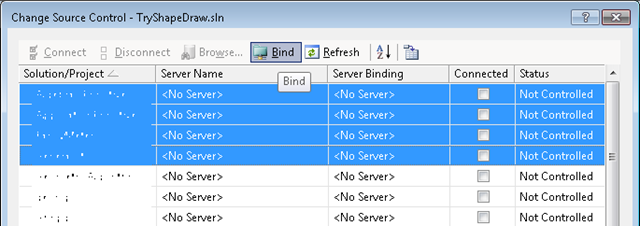
Just bind your projects individually. i.e., instead of clicking ‘bind’ on multi-selection:

image 

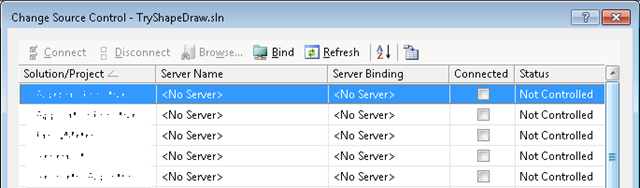
Repeatedly bind a single selection:

image

and separate MSSCCPRJ files would be created at every project folder. It can be a hassle for large solutions (I should know – I applied it to ~100 project solutions), but it’s a one-time hassle. For me, that seem to have solved the issue completely.

NOTE: we’re using Perforce 2007.1 and the issue may have been resolved since – although I find that improbable, as the issue seem to persist in the p4 knowledge base. The reason we’re not upgrading is that we’re migrating to TFS instead, and I can’t say I’m too sad about that.

Posted in Source Control, Visual Studio | Leave a comment

‘Internal CPS Error’ When Adding A Project Reference


Edit: This is now a confirmed VS bug.

Occasionally I get this –

image

– when trying to add a reference from one project to another in VS2010. I’ve no idea what CPS is and what shim object they’re talking about, but I’ve discovered a hack around it.

Suppose you’ve encountered this error when trying to add a reference from projectA to projectB. Albeit cryptic, the message distinguishes an actual project reference (which VS found), from some internal representation or (more likely) satellite object, the shim object – which is missing.

To resolve this discrepancy edit projectA.vcxproj (you can unload projectA, right click it and choose ‘edit’, but notepad would do just fine). Locate and delete the lines that encode the existing reference to projectB:


<ProjectReference Include=”..\projectB\projectB.vcxproj”>
<Project>{66d572b3-b340-47dc-94fe-93515aebaaf4}</Project>
</ProjectReference>

The discrepancy is fixed. Reload projectA in VS and merrily add the reference to projectB.

Posted in Visual Studio | 9 Comments