My Guest Post on the VC Team blog

I answered a public invitation by Eric Battalio of the VC team – and just now published an article on the VC blog, introducing the native Expression Evaluator:

Every time you use the Watch window, a lot is going on behind the scenes. Whenever you type a variable name, something needs to map that name to the memory address and type of the named variable, then display that variable, properly formatted based on its type. Conversely, when you modify the contents of a variable – something needs to take your text input, convert it to the right type and correctly update the memory at the right address.

That something is the Expression Evaluator. It is an impressive and often overlooked piece of technology and once familiar with it, you can put it to good use, sometimes in surprising ways!

Check it out!

Posted in Uncategorized | Leave a comment

Geometric Inverse Application 1: Barycentric Coordinates

Last time I jotted down some equations suggesting how you should understand 3d matrix inverses, or how to solve 3×3 equations. Below is a first application, for obtaining barycentric coordinates.

Barycentric coordinates are the canonical way of describing a point within a triangle (or more generally, within a polygon, or just any convex point set). Briefly put, suppose you’re given a triangle with vertices A, B & C, and an interim point P:

P’s position relative to A, B and C can be described by a set of 3 scalars, say α, β & γ, called its barycentric coordinates:

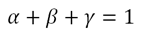
For P to lie in the plane formed by A, B & C these ingredients must satisfy –

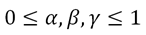
And for P to lie within the triangle, they must satisfy –

You can think of these equations as describing a recipe for cooking up P from the ingredients A, B & C: α as the amount of A you need to put in, β the amount of B γ of C. These coordinates are very useful, for example, for interpolation: quantities that are stored for A, B & C can be mixed with the same coefficients and applied to P.

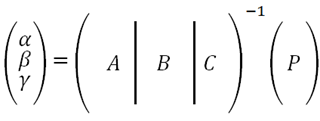
Now how do you actually find barycentric coordinates? Well, the equation defining them can be rewritten in matrix form:

Which gives a still-not-very-explicit expression for the coordinates:

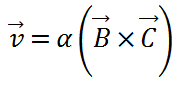
The derivation in the previous post gives a way to deduce expressions for each coordinate. Say, for α:

And similarly:

For some extra geometric flavour, note that these quotients can be understood as ratios of areas: α is the ratio of the area of the triangle P-B-C to the area of the full triangle A-B-C:

Finally, a correction of an apparently common misconception. I’ve heard a few times the interpretation of barycentric coordinates as a expressing distances of some sort – it is indeed tempting to think that if α is close to 1 then P’s distance from A is small. That just isn’t true. For example in this setup –

A is the triangle vertex closest to P, and still the α coordinate is zero – as low as it can get. When ‘cooking up’ P, we have to mix in only B and C – with no A at all.

Posted in Uncategorized | Leave a comment

Geometric Interpretation of a 3D Matrix Inverse

I work a lot with 3D calculations, and every so often a non trivial 3D tidbit comes along. Some of these might be of use to others – and so, by the power vested in me as absolute monarch of this blog, I hereby extend its scope to some light 3D geometry. I’ll try to keep posts in this category less rigorous and yet more verbose than regular math write-ups.

Take a 3×3 matrix that you wish to invert, say M. Think of its columns as 3-dimensional vectors, A, B & C:

image

Now take it’s sought-after inverse, M-1, and think of its rows as 3D vectors, say v, u & w. That means essentially:

image

Next focus just on v, M-1 ‘s first row. What can be said of it, in terms of A, B & C?  Looking in the first row of the multiplication result – the identity matrix – we see:

image

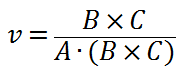
Which means in particular that v is orthogonal to both B and C. Assuming B and C aren’t co-linear (otherwise M wouldn’t be invertible in the first place) there is but a single direction in 3D space which is perpendicular to both, and it can be written as B×C  – vector-product or cross-product of B and C.  Hence v must be a multiplication by some scalar – say α – of this direction:image

To deduce α remember the v must be normalized so that its dot product with A gives 1.  And so:image

The triple product in the denominator, A∙(B×C), should look familiar: that is in fact det(M) – the determinant of the original matrix. Had we inverted M with a more traditional apparatus, say Kramer’s rule, we would have divided by this determinant directly.

Naturally similar expressions are obtained for the other rows, u & w :

image

All the denominators are in fact equal, to each other and to det(M).

Why all the hassle?

First, for the fun of it. Personally I find it much easier to understand – and thus remember – geometric stories than algebraic ones.

Second, this formulation exposes several optimization opportunities.

  1. After computing B×C you can obtain the first of (and so all of) the denominators, by simply taking a dot product with A.
  2. If you need just a single row of the inverse matrix, you can calculate it directly – without having to invert the entire matrix.
    This is not as far fetched as it might seem: say you formulate a 3×3 linear equation set, but you’re actually interested only in the 1st solution coordinate:imageJust take the 1st row of M’s inverse, as outlined above, and dot-product it with b:
    image

Third, using analytical expressions as above for solving linear equations is generally preferable to numeric solvers. For matrices as small as 3×3, solving numerically would probably be a bad idea anyway – even traditional, tedious inverses (with adjoint matrices and all) would be preferable to numeric solutions.

BTW, higher dimensional analogues do exist – and are as easy to derive – but the main added value, namely direct geometric insight, is lost beyond three dimensions.

Posted in 3D Geometry, Algorithms | 6 Comments

Mental Buffer

I’ve been through a lot in the last half a year.  Can’t say it’s behind me, but return to blogging might be part of the recovery. And making the declaration public vastly increases the chances of its actual happening.

So there it is. I’m back blogging.

Posted in General | Leave a comment

VS Support Policy

As far back as this MS support page goes, Visual studio editions had a 5-year mainstream support period, and since VS .NET 2003 – a 10 year extended support period. In particular, VS2010 mainstream support is advertised to end on Jul 14, 2015.

Now given that MS releases major new VS versions roughly once every 2 years, such a support period can be quite a burden. In my (much, much smaller) organization we don’t bother with backward support at all, we just ask those pesky cry-baby customers to upgrade to our latest version before we even consider checking their bug reports. The logistics of testing and patching multiple versions can admittedly get exhausting – so I would have had great respect to the magnitude of the task that DevDiv took upon themselves when they chose to support 2.5 versions backwards.

If they would have actually done so.

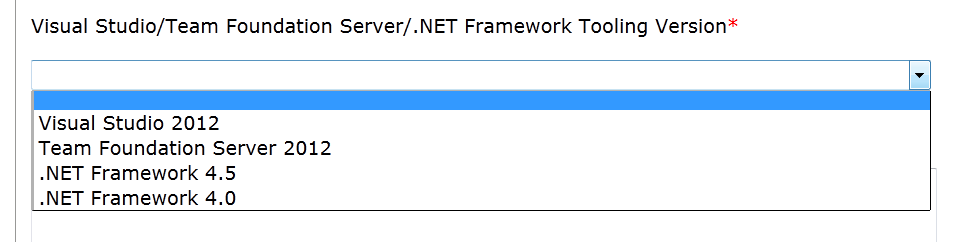
As of ~July 2012, the VS bug submission form in Connect no longer enables even reporting issues with VS versions prior to 2012 (note, I think that was before VS2012 even reached RTM):

image

Long before that, bugs I filed against VS2010, along with complete, consistent repros, were closed as either not reproducible or fixed – if they happened to be resolved in VS2012.

For all practical purposes, support in VS2010 ended less than 2 years after its release – and less than 1 year after its first service pack release!  In our organization (and I suspect in many others) we don’t even consider upgrading VS before the newest version has had its run, and reached a level of maturity attainable probably only at a service pack release. That leaves us with less than a year of practical support, which is beyond annoying – it borders on fraud.

I should probably post here more details about specific unresolved bugs I reported. Beyond that and the much needed venting, I don’t see much that can be done.

Posted in Visual Studio | Leave a comment

C++ Template Meta Programming is Still Evil

I won’t include a meta-programming intro paragraph here, since if you’re not familiar with it – I sincerely hope you stay that way. If you insist, get an idea online or read the book (it’s a good read, but can’t say I recommend it since the entire purpose of this post is to persuade you to not use what it teaches).

I don’t like meta-programming. Passionately so. What’s worse, I seem to be pretty much the only one: I can’t really find any anti-MP texts around!  So either

(a) There’s a community of MP-bashers lurking somewhere out of my reach,

(b) I’m waaaay off, and comments to this post would make me see my wrongdoing and shy away to a dark cave for a while,

(c) The world really misses an anti-MP manifest.

However the case turns out it would do me good to try and articulate these thoughts. Here goes.

Meta-Programming is Hacking, not Engineering

One might refer as hacking to pouring orange juice using chopsticks, cutting toothpastes open, or amplifying phones with glass pitchers.  On the less-adorable side, we also refer as ‘hacks’ to chewing gum car fixes. Here’s a suggested definition that tries to encompass the creative, improviser, and often lazy aspects of hacking:

Hacking: Achieving a goal by using something in a way it wasn’t designed for.

Defining the other side of the scale is much easier:

Engineering: the discipline, skill, and profession of acquiring and applying scientific … and practical knowledge, in order to design and build  …  systems and processes.

Now how would you classify meta-programming?   It’s inception, for one, gives a clear hint:

Historically TMP is something of an accident; it was discovered during the process of standardizing the C++ language that its template system happens to be Turing-complete, i.e., capable in principle of computing anything that is computable.

C++ types were never designed to perform compile time calculations. The notion of using types to achieve computational goals is very clearly a hack – and moreover, one that was never sought but rather stumbled upon.

The Price

Don’t take it from me, take it from two guys who know an itzy bit more about C++.

Herb Sutter, former secretary of the C++ standardization committee, is one.

Herb: Boost.Lambda, is a marvel of engineering… and it worked very well if … if you spelled it exactly right the first time, and didn’t mind a 4-page error spew that told you almost nothing about what you did wrong if you spelled it a little wrong. …

Charles: talk about giant error messages… you could have templates inside templates, you could have these error messages that make absolutely no sense at all.

Herb: oh, they are baroque.

Jim Radigan, MSVC compiler lead developer, probably understands a thing or two himself.

Jim: We’ve been able to use templates, we’ve been able to do a whole bunch of things.

Charles: Do you use advanced sort of meta-programming at the compiler level?

Jim: We try to steer away from really complex things like that because what happens is.. the tire hits the road when it’s two o’clock in the morning and somebody sends you a pri-zero bug, say, windows doesn’t boot.  …

so what we engineered for, clearly, is maintainability. You want somebody to come up to speed, be able to go in, binary search windows and step through the debugger in the compiler and find out where we did the illegal sequence.  …

One of the other things that happen when we go to check code into the compiler is we do peer code review. So if you survive that, it’s probably ok, it’s not too complex. But if you try to check in meta-programming constructs with 4-5 different include files and virtual methods that wind up taking you places you can’t see unless you’re in a debugger – no one is going to let you check that in.

… We do use STL, but we don’t go really abstract because we want to be able to quickly debug.

So bottom lines,  using meta-programming you end up pouring substantially more effort into writing code that even builds.  Your code maintainers end up pouring substantially more effort to be able to understand and debug that code.

The Benefit

Concise, elegant code.

As far as I can say, that is the sole benefit of this ordeal.

Think about that for a second. The very real reward for using MP in your code is the moment of satisfaction of having solved a hard riddle. You did stuff in 100 lines that would have otherwise taken 200.  You grinded your way through incomprehensible error messages to get to a point where if you needed to extend the code to a new case, you would know the exact 3-line template function to overload. Your maintainers, of course, would have to invest infinitely more to achieve the same.

I whole heartily empathize – I can get lost for days in such riddles (in and out of programming), and I still remember the joy of having first deciphered a SFINAE construct in code.

It might be a necessary stage in every developers professional path, but one must mature out of it. You have to return and think of your tools as exactly that, tools: unless you’re a standard committee member C++ is a means to an end, not a goal by itself. The geeky pleasure of having mastered the esoteric side effects of some language features is completely understandable, but engineering-wise the price can be formidable – so please, please, fight this temptation valiantly.

Perhaps some day..

The original post title was the way-more-catchy ‘MP is evil’. I modified it to ‘Still Evil’ because I have high hopes: C++11 seems to be very aware of the desire to make compile-time programming a designed language feature, and not just a collection of library hacks.

Let’s talk again in the future. I’ll be very open to revise my opinions when concepts are standardized and any compiler implements constexpr.

Posted in C++ | 36 Comments

_DllMain@12 already defined

We recently faced this linkage error:

error LNK2005: _DllMain@12 already defined in MSVCRT.lib(dllmain.obj)

Searching gives ~36K results as of July 2012, many of which seem high quality (StackOverflow, MS, CodeProject etc.), and I was certain it would be a simple matter of finding a fix online and blindly applying it. However it seems the root cause in our particular case wasn’t covered yet (AFAIK), and it seems worthwhile to document.

The MS KB article teaches that this is a linkage order problem – MFC libs must be linked before the CRT ones – but none of the fixes the article proposes worked. We did have one build configuration which was successful and one which failed with the above LNK2005 (Release – but it really doesn’t matter) so I dumped two /VERBOSE linker outputs for the two configurations and diffed them. After some admittedly tedious inspection, an interesting difference came up – these lines were dumped only in the successful build:

Found __afxForceUSRDLL

Referenced in Stdafx.obj
Loaded mfcs100d.lib(dllmodul.obj)

The symbol name implies that it is intended to force some linkage, and including it seems to have the beneficial effect of loading the mfc lib mfcs100d.lib.  Indeed, searching reveals the following lines in dllmodul.cpp:

#ifdef _X86_
extern "C" { int _afxForceUSRDLL; }
#else
extern "C" { int __afxForceUSRDLL; }
#endif

and the following in afx.h:

// force inclusion of DLLMODUL.OBJ for _USRDLL
#ifdef _USRDLL
#pragma comment(linker, "/include:__afxForceUSRDLL")
#endif

So it turns out there’s a single condition that governs the linkage to the MFC library mfcs100/d (the one containing DllModul.obj, which exports _afxForceUSRDLL), and that condition is – _USRDLL being defined.   Our linking project was indeed a dll and somehow the default _USRDLL preprocessor macro was missing from it – restoring the definition fixed the linkage.

So bottom line, if you get a ‘DllMain@12 already defined’ linkage error for a dll, here’s another thing to try: make sure _USRDLL is defined in your project C++ property sheets.

Posted in Debugging, MFC | 6 Comments

A Day with VS11 Beta – part 2.5: Auto Vectorizer, done right

Start at the end: the main example analyzed in the previous post is plain wrong. This loop:

for (int i=0; i<1000; ++i)   sum += a[i];

Vectorizes perfectly.

Even after me wrongfully accusing his team with this fictitious vectorization miss, Jim Hogg was kind enough to (1) test it and report this reduction loop is indeed vectorized, (2) link to my post, and worse yet, (3) say he enjoyed this blog.   What can I say, I’m embarrassed and humbled.   Thanks Jim.

My mistake was not – as Jim suspected – omitting /fp:fast. Rather, the problem was I coded multiple simple tests into a single console app main function, and debugged the resulting binaries from ICC/MSVC in disassembly mode.   From a more thorough inspection it seems both ICC and MSVC now do an aggressive interleaving of computations, and if as I suspect the aging PDB format still maps a consecutive range of instruction addresses to each source line – the debugger has a hard time matching location in disassembly to a source line. All in all, most probably I pulled the right conclusions on the wrong loops.

I did similar tests again – this time checking a single loop in every test.  A different case quickly turned up where ICC vectorizes and MSVC doesn’t:

double  a[2] = { 1., 2.};
double b[20000];
double S = 0;
for(int i=0; i<20000; i+=2)
S += a[0]*b[i] + a[1]*b[i+1] ;

And just to make extra sure, here’s some disassembly:

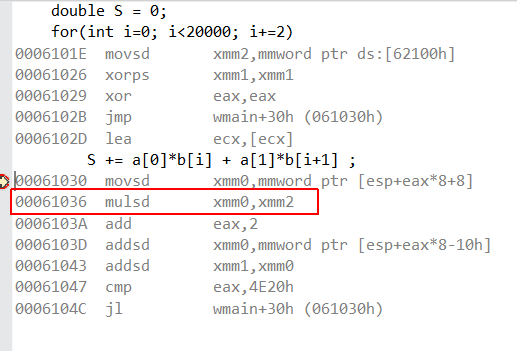
MSVC:

image

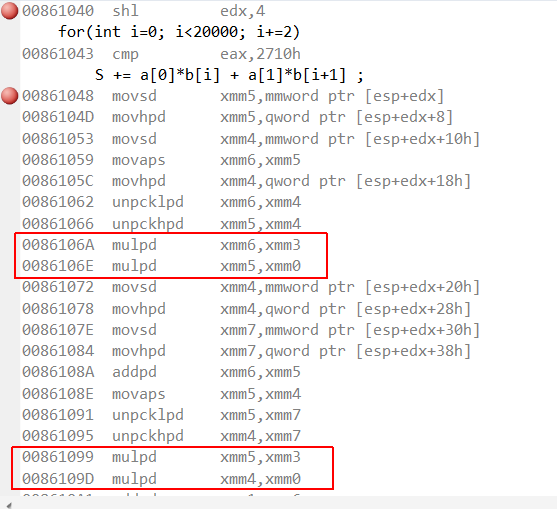
ICC:

image

ICC does some loop unrolling too so the code is harder to follow – but for skimming purposes it suffices to note the ‘packed double’ mul version (mulpd) in ICC, contrasted with the ‘scalar double’ mul version (mulsd) in MSVC. Similar results are seen in single precision floats too.

As in the previous post, this is simplified code that aims to capture the essence of real vectorizable scenarios. Suppose, for example, you need to transform a 3D mesh by a fixed rotation and translation. This amounts to a large loop with computations of the above type: one argument constant, the other scanning an array.  Such code might benefit considerably from auto vectorization.

The real test was the last one to be described at the blog: build and measure some real life computationally intensive code.  I did just that, and the results were – as noted – no measurable improvement over VC10.  So either my code has less to benefit from vectorization than I hoped, or – the gaps remaining in the vectorizer hold more promise than the gaps already filled.

I gotta try and measure performance with ICC one day – if I’ll ever have the patience. Our code builds for nearly half an hour on MSVC, so I’m guessing ICC builds would have to be done neither nightly or over-weekendly.

Posted in VC++ | 2 Comments

A Day with VS11 Beta – part 2: Auto Vectorizer

UPDATE: While I still believe the overall conclusions below hold, the actual analysis of the main example is erroneous and kept here only out of respect for some external links.  A detailed correction is in the following post.  Thanks @JimHogg!


Vectorization is inherently a low level topic, so when discussing it there is a tendency to go deep into technical details – thereby losing both a large part of the audience and the wider perspective. I’ll try to avoid these pitfalls here – so no disassembly screenshots today.

Background

For over 15 years one of the main evolution directions for processors has been SIMD: the application of an operation in a single cycle (more or less) to multiple data elements, stored consecutively in a wide register. Initial incarnations were limited to integer types and so not very useful, but when floating point support had started – developer interest caught up.

The bread-and-butter of current vectorization, at least on desktop platforms, is SSE: an ever expanding brand of x86 instructions and registers introduced by Intel. SSE registers are 128-bit wide and every SSE instruction modifies such a register – thereby processing either 4 single-precision or two double-precision floats in a single cycle.  Prior to SSE, MMX instructions operated on 64-bit wide registers, the post-SSE AVX instructions work on 256, rumor has it that the next core-2 generation would maintain 512b registers – you get the idea.

Of course someone needs to write code to execute all these fancy instructions. In most of these 15 years this burden laid on the developer – and to a large extent it still does. Either by .asm files, inline assembly or intrinsics – some low level maven has to code at instruction level to utilize all this extra processing power. Optimized libraries do help with some common math and image processing tasks, but to a large extent mainstream code has yet to benefit anything from vectorization. This may change if compilers become smart enough to recognize vectorizable portions of high-level code, and to do the vectorization themselves.

Auto-Vectorization is the coveted ability to do just that: have the compiler do the vectorization for you.

VS11 is Microsoft’s first step towards this noble goal. I read that the dev-preview was less than stellar, but haven’t seen anything about the beta. I care deeply for this particular feature and had high hopes for it, and so set out to explore.

Results

As the VC compiler guys demonstrate in this Channel 9 session, ‘embarrassingly parallel’ code vectorizes well:

float a[1000], b[1000], c[1000];
for(int i=0; i<1000; ++i)  a[i] = b[i] + c[i];

Reduction poses an extra challenge, as it introduces a semantic dependence among loop iterations – but the following still vectorizes well:

float sum = 0.0f;
for(int i=0; i<1000; ++i) sum += a[i];

As far as I my brief exploration went, the optimizer sees easily through object-oriented abstractions. In header-only container templates I also saw many cross-function vectorizations (namely, where inlining took place).

But.

A Big But

The party stops here:

for(int i=0; i<1000; ++i)    sum += a[i]*b[i];

This code does not vectorize in VS11 beta.

Mind you, this is not a contrived example – it is a fundamental computation type in BLAS, 3D and pretty much every quazi-mathematical code: vector-vector dot product, matrix-vector product, matrix-matrix product – are all essentially such sums of products.

Now vectorization plainly is hard, and this loop in particular.  Data dependencies that prevent auto vectorization (and parallelization in general) are –

  • Read after write,
  • Write after read,
  • write after write.

And the sum-of-products loop above seems to contain all three .  However:

  1. The same holds for the direct sum reduction loop:   for(…)  sum += a[i], that VC11 vectorizes successfully.
  2. It just so happens that the Intel compiler documentation uses this very code as example for vectorization of reduction loops:

…there is a very important exception, that apparently contains all of the above types of dependency:

sum=0;
for (j=1; j<MAX; j++) sum = sum + A[j]*B[j]
Although sum is both read and written in every iteration, the [Intel] compiler recognizes such reduction idioms, and is able to vectorize them safely.

Competition

Optimization-wise the Intel compiler is really where the bar is set. Not only does it successfully vectorize a much wider range of cases, it supplies extensive pragmas and switches to control vectorization and can even report which loops were vectorized, and to some extent – why vectorization failed where it did. (In all the tests above I inspected disassembly to tell which loops vectorized in MSVC).

The lack of all this functionality is very much acceptable in beta – and who knows, maybe some of it is actually there, details slowly unveil in Jim Hogg’s series of posts. I hope even more would be exposed in the RTM – but I would be (pleasantly) surprised if the range of vectorizable loops would be broadened.

Intel’s compiler is markedly slower and it might seem that MS deliberately makes different performance/productivity tradeoffs, but now that it’s obvious MS does want to get vectorization done – it’s also obvious that they’re simply playing catch-up in this field.

Bottom Lines

The code of most products I work on is a classic example of case where auto-vectorizer should be beneficial: the tasks are highly intensive computationally, the code is entirely C++ with almost no low-level optimizations, it is also highly branch intensive and it is hard to find single bottlenecks where manual optimizations would justify the investment.

I built and run one of our core products in VC11 beta and measured a ~10 minutes computational job.  I saw no performance improvement over VC10 (VC11 actually took a bit longer, but well within statistical error).

As of May 2012, devs still must hand-optimize the code to rip the benefits of ~1995 processor improvements. Perhaps you’d be the one to change that?

Posted in VC++ | 4 Comments

A Day with VS11 Beta – part 1

A large chunk of our customers still use XP so we won’t be upgrading VS any time soon. Still, out of curiosity I spent some free time with the VS11 Beta and below are some bits and pieces I noticed that I (mostly) haven’t read elsewhere.

Bug Fixes

I’m sure there are plenty, but MS doesn’t make the full list public (please join me in trying to fix that). I can say that two minor bugs that bothered me are indeed solved and one isn’t. Also, MS finally solved a major-ish issue I reported that prevented using STL containers on aligned elements. This last fix opens up some serious potential optimizations – I’d finally be able to make our matrices 16-byte aligned and apply SSE to them.

UI enhancements

I agree that the colorless GUI and ALL-CAPS-TITLES do not increase productivity, and I hope the options dialog does become resizable one day, but by and large I don’t understand the heat of this discussion .  Maybe it’s the most heavily discussed aspect of every new version just because it’s the most widely accessible aspect. Maybe it’s just fertile ground for MS-bashers – covering the entire range from ‘why did they change the GUI, I can’t find anything now’ up to ‘they just slapped some new GUI around the same product’.

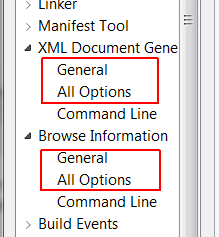
Here’s a thoughtful little addition to the UI: the Project Properties dialog now includes an ‘All Options’ sub-category, for most property categories (C/C++, Linker, etc.):

image

I didn’t think of it until after seeing this addition, but it entails some deep usability analysis. It probably seemed like a good UI practice to divide the jungle of compiler/linker switches into digestible-size categories, but in practice I often find myself wasting time looking for a single familiar option within inevitably vague categories.

They might have gotten a bit carried away, though.. :

image

Here’s another nice addition to the editor context menu:

image

Well, it will be nice when it actually works, anyway. In the mean time /showincludes does the work for me.

Editor enhancements

There are a ton of those – in syntax coloring, code completion, reference highlighting, code snippets and more, but I use the almighty Visual Assist extensively and the native IDE still has a way to go to catch up with it.

Debugger Enhancements

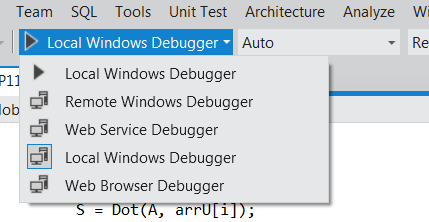
New debugging scenarios are now supported, and the visibility of different debugger configurations is vastly improved:

imageimage

I didn’t experiment with any web/GPU debugging myself yet, but these do seem promising.

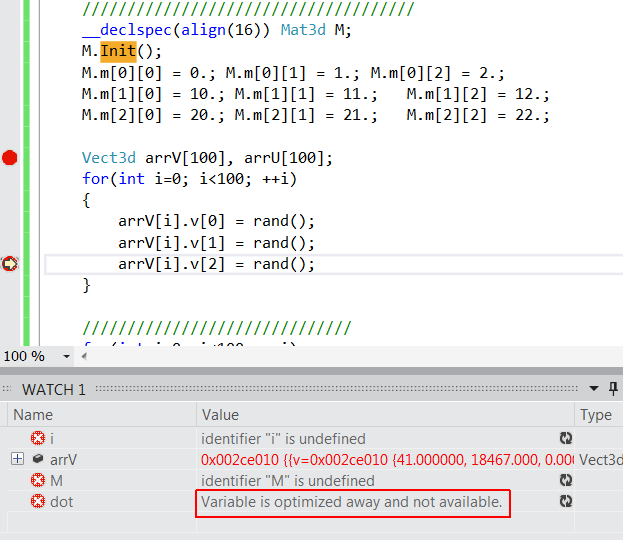
I do get a fair share of optimized builds debugging, and so had high hopes from the new advertised PDB improvements, that allow watching more variables and stepping into inlined functions in release builds.  So far, I have very little to write home about:

image

The vast majority of local variables (probably all those which are stored only in registers) are still un-watchable.  The ‘Variable is optimized away’ message is a nice direction, but still appears very sporadically. It doesn’t show in the screenshot, but I had no luck stepping into inlined functions too.

Next time…

The part I care most about are compiler enhancements, and specifically the auto vectorizer. More on that –in the coming post.

Posted in Visual Studio | 1 Comment