Windows Internals Course by Sela College

A word just for Israeli readers:

Sela College has agreed to open a Windows Internals Class in Ramat-Gan. It’s a 5 day course, every Sunday starting June 24.

It’s obviously based on the identically named book, and the syllabus is as in-depth as you can possibly get in a course. Planned instructor is internals veteran Noam Sheffer.

I consider this course a rare opportunity (no, really, next one is in 1.5Y if at all) for an assisted dive into some really deep water. I’m going, so are 6 of my colleagues, and if you’re interested – I recommend you join. Either online or otherwise.

Disclaimer: It was my request that started it and so I feel somewhat responsible and am trying to help spread the word. I’ve no affiliation whatsoever with Sela or any of their employees, and am genuinely thrilled about this course.

Posted in Uncategorized | Leave a comment

QuickTip: Toggle disassembly with Ctrl+F11

Short post today. For a long while I’ve been switching to disassembly with Alt+8, as appears under the Debug/Windows menu:

image

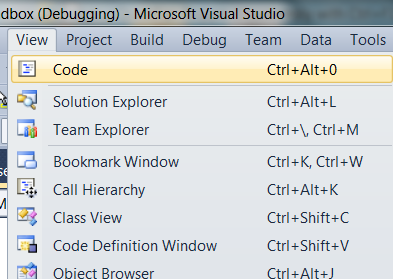
– and back with Ctrl+Alt+0, as appears under View menu:

image

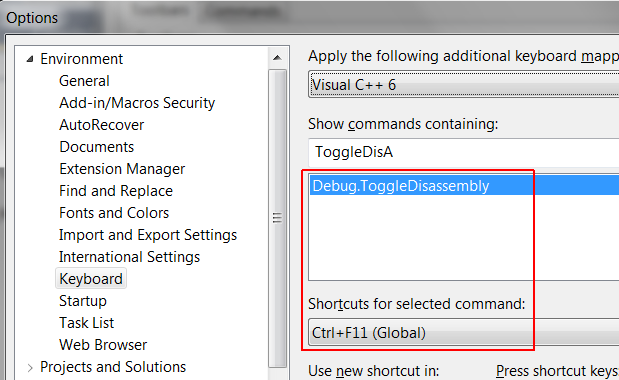
A while ago I discovered there’s a more pleasant shortcut, usable for both directions: Ctrl+F11, which is the default assignment to the IDE command Debug.ToggleDisassembly.

image

Happy disassembling.

Posted in Tips, Visual Studio | Leave a comment

Viewing types, part 3: Exceptions

Last time a way was shown to use internal RTTI mechanics to view C++ type names without direct debugger aid. There is one place in particular where such type names carry substantial information, and that is c++ exceptions. These can also require some additional treatment.

Native SEH exceptions are characterized – and can be caught – by a code. In contrast, C++ exceptions are characterized and caught by a type. So if you are debugging already within a catch-block (which is after some hefty compiler and runtime machinery already kicked in), you already have a direct view of the caught type, and need no extra trickery.

Where things get delicate is when a C++ exception goes uncaught in any C++ catch block, and is either caught in an SEH __except clause or goes completely uncaught and (hopefully) included in a core dump for you to analyze.  C++ exceptions, which are implemented on top of SEH ones, all utilize the code E06D7363 (standing for Exception, ‘M’ ‘V’ ‘C’ in ascii) and so cannot be distinguished by code. Some low-level trickery is in order.

The Old New Recipe

Sometime in 2010 Raymond Chen posted a recipe on how to view types of such exceptions (i.e.: originating in VC++, viewed in a context of SEH). Briefly, once you obtained an EXCEPTION_RECORD, do as follows:

Take Parameter 2 [of the exception record, O.S.] and go to the fourth DWORD and treat it as a pointer. (On 64-bit systems, you have to add this value to the HINSTANCE passed as Parameter 3 to convert it to a pointer.)

Next, go to the second DWORD and treat it as a pointer. (Again, on 64-bit systems, it’s really an offset from the HINSTANCE.)

Next, go to the second DWORD and treat it as a pointer. (64-bit systems: you know the drill.)

Finally, skip over the first two void*s and the rest is the class name.

And here’s a shameless cut & paste of his diagram:

EXCEPTION_RECORD
+----------+
| E06D7363 |
+----------+
|  ~~~     |
+----------+
|* ~~~     |
+----------+
|* ~~~     |
+----------+
| 3 or 4   |
+----------+
|* ~~~     |
+----------+
|*Object   |
+----------+     +---+
|*       ------> |~~~|
+----------+     +---+
|*HINSTANCE|     |~~~|
+----------+     +---+
                 |~~~|
                 +---+    +---+
                 | -----> |~~~|
                 +---+    +---+    +---+
                          | -----> |~~~|
                          +---+    +---+    +----------+
                                   | -----> |*   ~~~   |
                                   +---+    +----------+
                                            |*   ~~~   |
                                            +----------+
                                            |Class name|
                                            +----------+

Decorate with type names

If you’re thinking there’s gotta be a better way, you’d be right. Dumping VC++ intrinsic compiler types by compiling an empty file with /d1reportAllClassLayout – as done for type analysis – reveals a few types that directly relate to exception handling:

class _s__CatchableType    size(28):
+---
0    | properties
4    | pType
8    | _PMD thisDisplacement
20    | sizeOrOffset
24    | copyFunction
+---
class _s__CatchableTypeArray    size(4):
+---
0    | nCatchableTypes
4    | arrayOfCatchableTypes
+---
class _s__ThrowInfo    size(16):
+---
0    | attributes
4    | pmfnUnwind
8    | pForwardCompat
12    | pCatchableTypeArray
+---

Fitting these into Raymond’s diagram gives –

EXCEPTION_RECORD
+----------+
| E06D7363 |
+----------+
|  ~~~     |
+----------+
|* ~~~     |
+----------+
|* ~~~     |
+----------+
| 3 or 4   |
+----------+
|* ~~~     |
+----------+
|*Object   |  _s__ThrowInfo 
+----------+     +---+
|*       ------> |~~~|
+----------+     +---+
                 |~~~|
                 +---+
                 |~~~|  _s__CatchableTypeArray
                 +---+    +---+
                 | -----> |~~~|    _s__CatchableType
                 +---+    +---+    +---+
                          | -----> |~~~|   _TypeDescriptor
                          +---+    +---+    +----------+
                                   | -----> |*   ~~~   |
                                   +---+    +----------+
                                     .      |*   ~~~   |
                                     .      +----------+
                                     .      |Class name|
                                            +----------+

Into the debugger

Now for a toy – but real – example in VC. Take this code:

__try
{
throw std::runtime_error("adsf"); // throw a C++ exception
}
__except (EXCEPTION_EXECUTE_HANDLER ) // catch as a native exception
{
__debugbreak(); // can we identify the C++ type of the thrown exception?
}

Here’s an initial inspection of the exception record in the watch window:

image

NumberParameters being 3 indicates that this is an x86 system. The interesting parts are the contents of ExceptionInformation. Forget about parameter 1 for a minute, and let’s inspect parameter 2 – which by the analysis above should be of type _s__ThrowInfo:

image

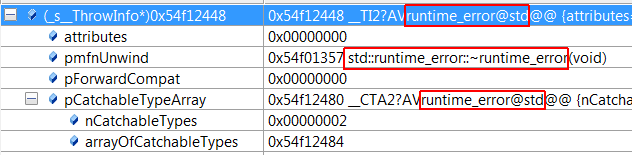
There seem to already exist multiple indications of the thrown C++ type name, as circled in red, with no need to go further down Raymond’s recipe. However this is only due to the fact that our toy code throws a standard type for which symbols are available. If such is the kind exception you’re facing – you can happily stop here. If you’re facing a custom type – follow this game a bit further.   For some reason VS properly recognizes the type of arrayOfCatchableTypes but does not expand it, so let’s do it ourselves:

image

And the name is available as part of the TypeDescriptor, as for a regular C++ type (bottom red rect). Undname.exe it – if the decorated name isn’t obvious enough – and view the type name as appeared in the source code.

Bonus: An Alternate (Arguably Better) Recipe

As Raymond notes, parameter 1 of the ExceptionInformation (red rect ‘1’ above) is usually a pointer to the C++ object being thrown. It might contain much more information that it’s type name (well, at least if it’s not a custom type it should be accessible to you), and as seen in the previous post – an object contains its own route to the TypeDescriptor and hence the type name.  Here’s how it looks in the watch window:

image

Raymond notes that parameter 1 usually points to the thrown object, but –

…sometimes there is some junk in front that you have to skip over. Once you figure out what it is, you can dump it. (I haven’t bothered trying to figure out exactly how much; I just dump bytes and figure out the correct start of the object by inspection.)

You can easily do that from within VS too: if the expression in the example

  (_s__RTTICompleteObjectLocator**)(*(int*)0x003bf75c-4)

(containing the direct parameter 1, 0x003bf75c) expands to rubbish, start increasing the pointer until you arrive at meaningful struct contents. This seems a faster way to get to the information of interest since you get to the thrown object and its type name in a single search.

Posted in Debugging, VC++ | 1 Comment

Viewing types, part 2: the manual way

Compiling with /d1reportAllClassLayout, even an empty file, dumps many compiler-intrinsic types. Six of these are interesting in the present context:  _PMD, _TypeDescriptor, _s__RTTIBaseClassDescriptor2, _s__RTTIBaseClassArray, _s__RTTIClassHierarchyDescriptor, and _s__RTTICompleteObjectLocator.

Most of this machinery exists solely for multiple inheritance, and virtual inheritance in particular – which modern languages eschew and is considered (I hope) a painful legacy by all current C++ professionals, and so I won’t go further in. Go here for an excellent survey on these deep internals of multiple inheritance and RTTI.

Turns out that for viewing types in sane (== single inheritance) code, two of these intrinsic types suffice:

1> class _TypeDescriptor    size(8):
1>      +—
1>   0    | pVFTable
1>   4    | spare
1>   8    | name
1>      +—
1>
1> class _s__RTTICompleteObjectLocator    size(20):
1>      +—
1>   0    | signature
1>   4    | offset
1>   8    | cdOffset
1>  12    | pTypeDescriptor
1>  16    | pClassDescriptor
1>      +—

The gem mentioned above tells us that an RTTICompleteObjectLocator pointer is placed right before the vftable. (This struct is responsible for locating the adjoint vftable within a larger vftable in the case of multiple inheritence, where method dispatching requires adjustor thunks, dynamic-casts require traversal of the full inheritance tree and things get hairy in general.  Not another word on that, I swear).

RTTICompleteObjectLocator contains a pointer to a TypeDescriptor, which happily points to a name!   To view this in the debugger, take a typed pointer (say, pb -sticking with the setup from last time), and type at a watch window

(_s__RTTICompleteObjectLocator**)((int*)pb->__vfptr – 1)

Here’s what you’d see:

image

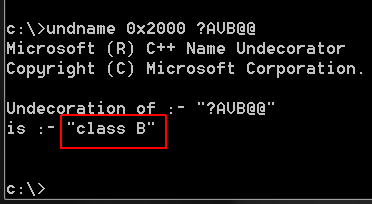
That is (naturally) a decorated name, so pop open a VS command prompt and call undname.exe with the 0x2000 flag (decipher types) and that name string, omitting the leading ‘.’ :

image

And now, for something completely useful.

All the above may seem like a very roundabout – albeit cool – way of seeing what the debugger already shows, but this does present a very useful trick:

What if you don’t have symbols?

It is very easy to recognize dispatching of virtual functions (call on a register argument), and typically a few instructions before that $ecx would be populated with the ‘this’ pointer.  Now, you can know the name of the type whose methods you call, even without symbols!   (assuming the code was built with RTTI on).

E.g., around this virtual method call:

image

Type this at a watch window:

(_s__RTTICompleteObjectLocator**)(*(uintptr_t*)$ecx-sizeof(int*))

(some complexity added to conform also to x64 systems, thanks @Martin Ridgers!), and you’ll be greeted be a magnificent view:

image

Posted in Debugging, VC++ | 3 Comments

Viewing types, part 1: The Normal way

Suppose C derives from B, which derives from A:

class A
{
public:
virtual void A_virt() {}
};

class B : public A
{
public:
virtual void B_virt() {}
};

class C : public B
{
public:
virtual void C_virt() {}
};

Now create A-pointers which point to children types, B and C, and watch them in VS:

image

The types in square brackets are the most derived types of the referenced objects. How does the debugger know them?

It can’t be pdb-voodoo, as evidently dynamic types are runtime only info. This info has to lurk somewhere in memory accessible at run time to the debugger.

Now where would be a good place to store such info?  We (wearing compiler designer hats for a second) could embed type info into every object instance, but that would be a gross duplication. We need a place that holds info common to all instances of the same class.

Such as, say, a virtual table.

– which is exactly where compiler writers do put run-time-type-info (RTTI).

Evidence (1): Watch the type name at the __vfptr value (circled in red above).

Evidence (2): mess with the __vfptr directly. Change pb->__vfptr to contain C::vftable:

image

And watch pb’s type miraculously change to C in the watch window:

image

Evidence (3): delete all virtual methods from A, B, and C, and watch the most-derived-type info disappear.

Evidence (4): compile without RTTI,

image

and watch the most-derived-type data disappear again.

So the debugger uses RTTI information, that is somehow attached to the vtable, to display type information. If the debugger can, perhaps we can do it ourselves when we must?…

Posted in Debugging, VC++ | Leave a comment

On AFX_MODULE_STATE, Appendix

My recent AFX_MODULE_STATE plunge was driven by some real world problems. In parallel to the write-up I mailed the current MFC chief maintainer, Pat Brenner – who directly invited such user interaction.

The correspondence that ensued makes semi-official claims that aren’t documented elsewhere. I got Pat’s approval to blog it – and here it is, almost verbatim (slight abridges to keep to the technical stuff).  

Thanks a lot Pat!


From: Me
To: Pat
Subject: MFC Module States Question

suppose a dll calls back into an executable, as described here. If the callback uses AFX_MANAGE_STATE(AfxGetStaticModuleState()) the program asserts, and doesn’t find the (exe’s) resource handle. The solution that worked for me – which I suggested at that forum – is to use instead the undocumented AFX_MANAGE_STATE(AfxGetAppModuleState()).

Next, suppose some functionality that consumes resources is written in a static lib, and linked into both an executable and a dll (of the same application). Now neither Static nor App module states can work for both cases…

As a user I would expect that AfxGetStaticModuleState would have identical semantics when called from a dll and from an executable (that’s how I view the ‘Static’ description). Digging around the MFC sources I have a conjectured reason why it isn’t so:

RawDllMain(HINSTANCE hInstance, DWORD dwReason, LPVOID)

includes the lines –
// set module state before initialization
_AFX_THREAD_STATE* pState = AfxGetThreadState();
pState->m_pPrevModuleState = AfxSetModuleState(&afxModuleState);

If similar statements would have run somewhere during the exe module initialization, AFX_MANAGE_STATE(AfxGetStaticModuleState) would have worked equally well there too.

-Ofek

From: Pat
To: Me

…I’ve checked with some other knowledgeable MFC folks and here’s the upshot.

AfxGetStaticModuleState is meant to be used ONLY by DLL functions, and NOT by the main executable. That function will return a NULL pointer when called from the Exe. AfxGetAppModuleState is not documented, and should be, as it is the correct function to call when another MFC module may call back into the exe. There are some very old KB articles and other things that mention this. Normally, the use of the “App” version would not be needed; but when another MFC module has called back into the app (rather than just returning to the app) like this, it would be appropriate to call it to fix the module state. So in your scenario of a static library, you will need to #ifdef your code (just as MFC does for DLL/static) so your code calls the right method.

We will get documentation for AfxGetAppModuleState written so it is no longer undocumented.

Pat Brenner

From: Me
To: Pat


The problem with the #ifdef solution for a static library, is that during the static lib generation there’s no general way to tell whether the resulting lib would be linked into an exe or into a dll. This is not (as far as I understand) the MFC scenario where the same source code can form either an exe or a dll – my source generates a lib either way.
The root issue that I don’t understand is why the need for two different module-state accessors (AfxGetStaticModuleState & AfxGetAppModuleState). As noted, it seems that the code line that makes AfxGetStaticModuleState work, is the line from RawDllMain:
AfxSetModuleState(&afxModuleState);
If a similar line would be called somewhere along the initialization of an exe module (maybe just somewhere more general, say in the initialization of a WinApp), it seems the ..GetStatic.. api would work for both dll’s and exe’s.
Was that a deliberate decision to separate the API’s? is there some design consideration or technical limitation i’m missing?

From: Pat
To: Me
Subject: MFC Module States Question

Hello Ofek,

I’ve checked with another MFC expert, and here is our opinion:

We don’t think there’s a one-size-fits-all solution here.  Changing things at the level of RawDllMain can be very complicated, and have unexpected downstream effects.  Your statement contains the word “seems” and that often gets me into trouble, given the life-span of MFC and the applications written with it.  A change like this might pass all my regression tests and then break some customer after we ship the change.  Additionally, I don’t believe you should call either of the functions when linking into an MFC extension (rather than regular) DLL.  Or maybe one is OK, but the other not—I would have to investigate to know for sure.

The bottom line is that static libraries are probably overstepping their bounds when doing anything that affects module state.  As you said, the static library code doesn’t know the type of module it is linked to, so that makes any module state manipulation dangerous.

Posted in MFC | 1 Comment

Microsoft’s Known Issues Policy

As far as I can tell, there isn’t anything there you might seriously call a policy.

Well there is an old ‘knowledge base’ searchable either via a solution center or technet. It includes, however, only known issues that MS support personnel have already encountered and resolved or (mostly) worked around.

There are various MS-maintained forums and communities, in which MS devs are often active, but MS devs certainly do not initiate any discussions on open issues there.

There is connect – which is a great initiative by itself, and which I personally use a lot. It includes, however, only bugs that users have reported. How many are these? Well, Pat Brenner recently wrote that –

[MFC 11] Fixed over 220 bugs, nearly 100 of which were reported by customers via the Connect web site

So extrapolating it seems fair to assume that most of the known bugs at any given time are not reported by users, and developers are forced to re-discover them time and time again.

MS actually seems quite behind on industry-standard issue disclosure policies: I can’t find serious release notes or other form of known-issues-list anymore. There was something for 2005 express editions, and a blog post for 2010 Release Candidate. But nothing serious and official about any professional versions.


So, I’ve made a suggestion at the Visual Studio UserVoice site:

[…] I’d love to see a live, public repository of known issues, updated with their triage results and expected resolution (if any).

Some examples:
https://bugzilla.mozilla.org/
http://bugs.sun.com/bugdatabase/

Beyond the potential saving in developer frustration, MS might gain valuable insight into impact and prioritization of known issues, which you might want to consider, e.g., when planning service packs.

Of course all the above does not hold for security bugs.

If you agree, please take a minute to vote this suggestion up. If not – I’d love to hear why! Please comment and explain.

Posted in Visual Studio | Leave a comment

On AFX_MODULE_STATE, or – Avoiding afxCurrentInstanceHandle Asserts, Part 2

(Part 1.)

The AFX_MANAGE_STATE macro is an iceberg-tip of some heavy machinery, whose documentation leaves much to be desired. Here’s an attempt to fill in some more blanks.

Mid-Depth Dive

Answering a question raised at part 1, the basic statement –

AFX_MANAGE_STATE(AfxGetStaticModuleState())

couldn’t be made simpler, simply because a broad statement like ‘always use resources from the last called-into user-module’ just won’t hold. You must leave a way for a developer to say stuff like ‘this GUI call, in that DLL, needs to use resources from my main executable’. So some coding must be done, one way or another.

So what alternatives are there to AfxGetStaticModuleState? Basically there are only 4 available module state accessors:

  1. AfxGetModuleState()
  2. AfxGetAppModuleState()
  3. AfxGetStaticModuleState()
  4. AfxGetOleModuleState()

AfxGetOleModuleState() accesses MFC-internal resources, and isn’t really useful to users.

AfxGetStaticModuleState() accesses a per-dll module state. It technically returns the static variable –

_AFX_DLL_MODULE_STATE afxModuleState

– defined in dllmodul.cpp. This file is built into the static-lib component of MFC (such a component exists even when you link against MFC dynamically!), and thus the variable afxModuleState is instantiated separately when every dll is loaded. Hence, this is the module state that you want to switch to and back from (via the AFX_MANAGE_STATE macro), when you need to access dll-specific resources.

AfxGetAppModuleState() accesses a per-executable module state. Technically it returns _afxBaseModuleState, defined as –

PROCESS_LOCAL(_AFX_BASE_MODULE_STATE, _afxBaseModuleState)

– in afxstate.cpp. There’s really nothing ‘process local’ in the PROCESS_LOCAL macro, but since afxstate.cpp is built into mfc[ver][u][d].dll, it is indeed a process-wide singleton (provided that all the user dll’s link to MFC dynamically, and against the same MFC version, as they should).

AfxGetModuleState() accesses the currently active module state. This is actually a tricky concept: the currently active module state is managed per-thread, as the member m_pModuleState in the aptly named _AFX_THREAD_STATE type. The AfxGetModuleState implementation falls back essentially to AfxGetAppModuleState if the thread’s ‘current’ module state is null.

Advanced Scenarios

Suppose a dll calls back into the executable, and this callback needs to access exe resources:

// MyDll.cpp:
void DllFunc( tCallback cb ) { cb(); }

// MyExe.cpp:
typedef void (*tCallback)();
void MyCallback()
{
// What do you declare here to access the proper resource handle?
MyDialog dlg; // this dialog template is an *exe* resource
dlg.doModal();
}

int main()
{
DllFunc(MyCallback);
return 0;
}

As noted the only documented module-state management facility is AFX_MANAGE_STATE(AfxGetStaticModuleState()). One would hope that ‘the root executable’ can be a valid ‘StaticModuleState’ but it turns out that the implementation treats dll’s and exe’s differently and this facility doesn’t hold in this case. As I answered on SO a while ago, the undocumented AfxGetAppModuleState gets the job done here, and the right code is –

void MyCallback()
{
AFX_MANAGE_STATE( AfxGetAppModuleState() );
MyDialog dlg;
dlg.doModal();
}

One can easily form even more exotic scenarios: what if dll1 calls into dll2 which calls into dll3, and this topmost function needs to utilize resources from dll1? What if a function using resources is implemented once in a static lib, linked against both an exe and a dll and is called from both?

There are no off-shelf facilities for such cases, I imagine mostly because it’s very non-obvious what is the expected behaviour for them. Using the ready MFC-generated module states and accessors already mentioned one can generally tailor the module-state behaviour to one’s needs. If worst comes to worst you can technically create and manage your own module states, but I have yet to see a situation where AFX_MANAGE_STATE with AfxGetStatic/AppModuleStates does not suffice.

Final Thoughts

Afx module states are just complex. Much of the complexity stems from the real complexity of the tasks at hand: the already-formidable task of masking away resource-handle management must be implemented to support contexts of executables, dll’s and static libs, all linked either dynamically or statically against MFC.

Still, the documentation is badly outdated. (the main technical article refers to MFC 3 and a windows 3.1 relic called Win32s), and the actual initialization of potential module states and thread states seems much more complicated than it needs to be. I have this nagging fear that even MS engineers tread very carefully around the darker corners of this code.

Posted in MFC | Leave a comment

On AFX_MODULE_STATE, or – Avoiding afxCurrentInstanceHandle Asserts, Part 1

All too often I see one of these asserts fire:

ASSERT(afxCurrentInstanceHandle != NULL)
ASSERT(afxCurrentResourceHandle != NULL);
ASSERT(afxCurrentAppName != NULL);

These are coded in afxwin1.inl, and are part of the MFC high level accessors:

AfxGetInstanceHandle()
AfxGetResourceHandle()
AfxGetAppName()

If these asserts fire for you too, there’s a good chance you’re missing some afx module state management code.

Module States – Purpose

Most Win32 GUI functionality accesses resources in one way or another, and thus requires a resource handle. For example, MFC’s CDialog::DoModal() includes essentially the following calls:

…
hInst = AfxFindResourceHandle(m_lpszTemplateName, RT_DIALOG);
HRSRC hResource = ::FindResource(hInst, m_lpszTemplateName, RT_DIALOG);
hDialogTemplate = LoadResource(hInst, hResource);
…

Where hInst is an HINSTANCE obtained from either the currently running exe or the currently running dll.

Which poses the problem: which one?

I.e., any binary in the address space can contain resources. Should the dialog-creation code search the dialog resource at the executable, or one of the dll’s? How would the code know?

A user of native Win32 API is on his own here, and must explicitly create resource handles from loaded binaries, manage their lifetime and choose the proper one when actual resources are required. MFC pioneers had the noble intention of masking this madness from their users, and thus the AFX_MODULE_STATE apparatus was born: a module state is – roughly put – a wrapper around all binary-specific-data (e.g. resource handle) that is to be switched upon any call from one binary into another.

Note that module states include much more than resource handles (check afxstate_.h and see), but resource management does seem to be the canonical usage – actually the only usage for me personally.

Module States – Basic Usage

Module-data management wasn’t thoroughly hidden away from the developer, but the coding involved was indeed reduced to a minimum. The most succinct description I know is part of the wizard-generated code for an MFC dll:

//TODO: If this DLL is dynamically linked against the MFC DLLs,
// any functions exported from this DLL which call into
// MFC
must have the AFX_MANAGE_STATE macro added at the
// very beginning of the function.
//
// For example:
//
// extern “C” BOOL PASCAL EXPORT ExportedFunction()
// {
// AFX_MANAGE_STATE(AfxGetStaticModuleState());
// // normal function body here
// }
//
// It is very important that this macro appear in each
// function, prior to any calls into MFC. This means that
// it must appear as the first statement within the
// function, even before any object variable declarations
// as their constructors may generate calls into the MFC
// DLL.
//
// Please see MFC Technical Notes 33 and 58 for additional
// details.

So it boils down to a single declaration at the start of a function:

AFX_MANAGE_STATE(AfxGetStaticModuleState());

This is classical RAII usage: the macro generates an object, whose ctor and dtor perform substitution of the module state into a specified slot (more on this slot in later posts). The resulting code is not only compact – albeit admittedly cryptic – but also exception safe.

‘Functions which call into MFC’ is a bit of a broad phrasing (surely CString usage isn’t considered ‘calling into MFC’). I understand this wording as ‘functions which make GUI calls’.

This single line of code is the only documented way of managing state, which makes one wonder why AfxGetStaticModuleState wasn’t baked into the AFX_MANAGE_STATE macro in the first place. More on this – in the next post.

Posted in MFC | Leave a comment

RGB vs. BGR in Bitmaps

What is the channel order in bitmap pixels? Does the R channel occupy the least- or most- significant byte?

Ah, the answer to this simple question held me back for nearly a day while debugging some image processing code. MSDN, while being excruciatingly verbose on obsolete legacies of bitmaps (device-dependent bitmaps, anyone?) is remarkably mysterious here.

First, they note that:

The system and applications use parameters and variables having the COLORREF type to pass and store color values … Applications can create a color value from individual component values by using the RGB macro.

Which says that R is the least-significant (as in COLORREF). This drove the original design of my code, but external viewers kept showing the colors wrong in images I produced.

Reversing the buffer contents from RGB to BGR solved the problem – the cleanest way is just using RGBQUAD instead of COLORREF. Still, to this moment I cannot find an explicit mention of this being the expected channel order in bitmap storage.  There’s this quote:

When creating or examining a logical palette, an application uses the RGBQUAD structure to define color values and to examine individual component values.

And this:

The RGBQUAD structures specify the RGB intensity values for each of the colors in the device’s palette.

Both docs indicate that RGBQUAD is the expected channel order for indexed bitmaps: those where pixel colors are not stored explicitly, but as indices into a central color-table (or palette). This hasn’t really been useful since devices started to show more than 256 colors, but it feels like the docs still consider it more important than non-indexed bitmaps.

Turns out that that for regular, non-indexed bitmaps – i.e., biBitcount equals 16, 24 or 32 – the expected channel order is the same as for the palette: R being the most significant byte.

Extra Chatter

If you insisted you could force a different channel ordering on the stored bitmap, using color masks (it’s a wikipedia link – by far more readable than MSDN). You’d have to –

  1. use either BITMAPV4HEADER or BITMAPV5HEADER.
  2. Set the bV4V4Compression (historical typo?) or bV5Compression fields to BI_BITFIELDS.
  3. Set the bVxRedMask/bVxGreenMask/ bVxBlueMask to indicate your desired channel masks (x being 4 or 5).
  4. Expect the rest of the world to have massive trouble using your images.
Posted in Win32 | Tagged , | 2 Comments